BABY born® Doll & Playtime Fun on Windows Pc
Developed By: Blue Ocean Entertainment AG
License: Free
Rating: 4,0/5 - 2.110 votes
Last Updated: August 05, 2026
Game Details
| Version |
1.4.500 |
| Size |
500.6 MB |
| Release Date |
November 15, 25 |
| Category |
Role Playing Games |
|
Game Permissions:
Allows applications to open network sockets. [see more (3)]
|
|
What's New:
We have made adjustments to bring the app up to the latest technical standards. [see more]
|
|
Description from Developer:
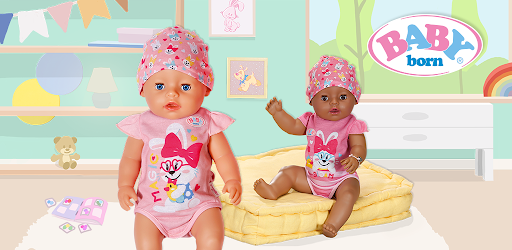
Explore the little ones’ home and enjoy a wonderful day together. Take good care of your BABY born, dress them in cute outfits, and play with them. Lots of fun for all doll parents... [read more]
|
About this game
On this page you can download BABY born® Doll & Playtime Fun and play on Windows PC. BABY born® Doll & Playtime Fun is free Role Playing game, developed by Blue Ocean Entertainment AG. Latest version of BABY born® Doll & Playtime Fun is 1.4.500, was released on 2025-11-15 (updated on 2026-08-05). Estimated number of the downloads is more than 1,000,000. Overall rating of BABY born® Doll & Playtime Fun is 4,0. Generally most of the top apps on Android Store have rating of 4+. This game had been rated by 2,110 users, 1,363 users had rated it 5*, 288 users had rated it 1*.
How to play BABY born® Doll & Playtime Fun on Windows?
Instruction on how to play BABY born® Doll & Playtime Fun on Windows 10 Windows 11 PC & Laptop
In this post, I am going to show you how to install BABY born® Doll & Playtime Fun on Windows PC by using Android App Player such as BlueStacks, LDPlayer, Nox, KOPlayer, ...
Before you start, you will need to download the APK/XAPK installer file, you can find download button on top of this page. Save it to easy-to-find location.
[Note] You can also download older versions of this game on bottom of this page.
Below you will find a detailed step-by-step guide, but I want to give you a fast overview of how it works. All you need is an emulator that will emulate an Android device on your Windows PC and then you can install applications and use it - you see you're playing it on Android, but this runs not on a smartphone or tablet, it runs on a PC.
If this doesn't work on your PC, or you cannot install, comment here and we will help you!
Step By Step Guide To Play BABY born® Doll & Playtime Fun using BlueStacks
- Download and Install BlueStacks at: https://www.bluestacks.com. The installation procedure is quite simple. After successful installation, open the Bluestacks emulator. It may take some time to load the Bluestacks app initially. Once it is opened, you should be able to see the Home screen of Bluestacks.
- Open the APK/XAPK file: Double-click the APK/XAPK file to launch BlueStacks and install the application. If your APK/XAPK file doesn't automatically open BlueStacks, right-click on it and select Open with... Browse to the BlueStacks. You can also drag-and-drop the APK/XAPK file onto the BlueStacks home screen
- Once installed, click "BABY born® Doll & Playtime Fun" icon on the home screen to start playing, it'll work like a charm :D
[Note 1] For better performance and compatibility, choose BlueStacks 5 Nougat 64-bit read more
[Note 2] about Bluetooth: At the moment, support for Bluetooth is not available on BlueStacks. Hence, apps that require control of Bluetooth may not work on BlueStacks.
How to play BABY born® Doll & Playtime Fun on Windows PC using NoxPlayer
- Download & Install NoxPlayer at: https://www.bignox.com. The installation is easy to carry out.
- Drag the APK/XAPK file to the NoxPlayer interface and drop it to install
- The installation process will take place quickly. After successful installation, you can find "BABY born® Doll & Playtime Fun" on the home screen of NoxPlayer, just click to open it.
Discussion
(*) is required
Explore the little ones’ home and enjoy a wonderful day together. Take good care of your BABY born, dress them in cute outfits, and play with them. Lots of fun for all doll parents!
DISCOVER BABY BORN’S WORLD
• Choose a doll and go on a journey of discovery—BABY born’s house has many exciting rooms for you to explore.
• Check out all the cute clothes in the closet. Use the weather duck on top of the closet to choose what the weather will be for your doll today, and pick a matching outfit!
• Feel like seeing the great outdoors? There’s lots to discover outside the house too!
TAKE GOOD CARE OF YOUR BABY BORN
• Take care of your BABY born just like a real baby and give them everything they need.
• Is your baby hungry? Then go to the kitchen and feed them baby food or give them a bottle.
• Change your doll’s diaper or sit them on the potty.
• Brush your little one’s teeth: brushing baby’s teeth is even more exciting with the fun toothbrushing song!
• Bubbles everywhere during bath time!Put your doll in the bathtub in the evening, lather them up well, and carefully rinse them down with the showerhead.
• Watch a picture story together with your baby when it’s time to go to sleep. Then it’s nighty-night after a fun-packed day!
PLAY WITH YOUR BABY BORN
• Discover puzzles and painting in the playroom.
• Tricky jigsaw puzzles with cute BABY born designs await you.
• No matter if you’re coloring pictures or drawing freehand, things never get boring here!
• And when you’re done playing, it’s time to tidy up. Can you find BABY born’s five animal friends?
If you like the app, we’d love to hear your review in the comments!
The Blue Ocean team wishes you lots of fun playing!
THINGS FOR PARENTS TO KNOW
• The app contains the original products from Zapf.
• Children care for their BABY born in fun minigames. There are also cute picture stories, a toothbrushing song, puzzles, and coloring games to keep your little ones entertained.
• The games support, inspire, and encourage children in a playful manner.
• The parental controls allow you to limit your children’s playtime to a certain number of actions.
• The app does not require any reading skills to be played.
• The toothbrushing song and picture stories can be enjoyed in 13 different languages.
• We value quality and product safety.
• The app is free; it is ad-supported. However, the ads can be removed via in-app purchase.
If something isn’t quite working right:
Due to technical developments, we are reliant on feedback from BABY born fans. Please share a detailed description of the problem along with information about the device generation and its operating system version to help us quickly fix any technical issues. If you have any questions or suggestions, please email us at apps@blue-ocean-ag.de. We’re always happy to hear from you!
There's a lot to discover here - and we make sure that our app is completely child-friendly and safe.
To be able to offer the app free of charge, advertising is shown. For these advertising purposes, Google uses the so-called advertising ID, a non-personalized identification number for a specific end device. This is required for purely technical purposes.
Privacy policy
There's a lot to discover here - and we make sure that our app is completely child-friendly and safe. To be able to offer the app free of charge, advertising is shown. For these advertising purposes, Google uses the so-called advertising ID, a non-personalized identification number for a specific end device. This is required for purely technical purposes. In addition, we only want to show relevant advertising. Therefore, we transfer the information on which language the app is played when an ad request is made. To play the app, your parents must agree to Google’s request for "storing and/or accessing information on your device". The app can unfortunately not be played if the use of this technical information is denied. Your parents can find more information in the parent’s area.
We have made adjustments to bring the app up to the latest technical standards.
Allows applications to open network sockets.
Allows applications to access information about networks.
Allows using PowerManager WakeLocks to keep processor from sleeping or screen from dimming.


