Abyss of Dungeons on Windows Pc
Developed By: KRAFTON, Inc.
License: Free
Rating: 4,2/5 - 16.277 votes
Last Updated: August 05, 2026
Game Details
| Version |
1.204.01 |
| Size |
495.5 MB |
| Release Date |
January 20, 26 |
| Category |
Adventure Games |
|
Game Permissions:
Allows applications to open network sockets. [see more (9)]
|
|
What's New:
■ The Soft Launch in the USA and Canada opens on February 5th at 12:00 AM UTC!■ Experience intense PvP & PvE battles in a medieval fantasy dungeon... [see more]
|
|
Description from Developer:
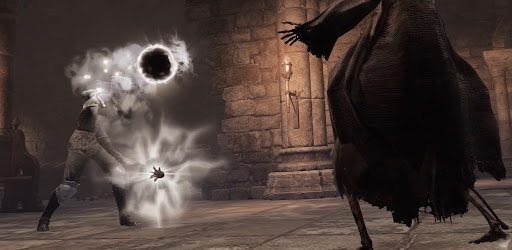
KRAFTON's new title, Abyss of Dungeons, is a dark fantasy extraction RPG set in medieval dungeons.
This game rewards the brave and bold by blending elements from various genres... [read more]
|
About this game
On this page you can download Abyss of Dungeons and play on Windows PC. Abyss of Dungeons is free Adventure game, developed by KRAFTON, Inc.. Latest version of Abyss of Dungeons is 1.204.01, was released on 2026-01-20 (updated on 2026-08-05). Estimated number of the downloads is more than 1,000,000. Overall rating of Abyss of Dungeons is 4,2. Generally most of the top apps on Android Store have rating of 4+. This game had been rated by 16,277 users, 10,459 users had rated it 5*, 1,830 users had rated it 1*.
How to play Abyss of Dungeons on Windows?
Instruction on how to play Abyss of Dungeons on Windows 10 Windows 11 PC & Laptop
In this post, I am going to show you how to install Abyss of Dungeons on Windows PC by using Android App Player such as BlueStacks, LDPlayer, Nox, KOPlayer, ...
Before you start, you will need to download the APK/XAPK installer file, you can find download button on top of this page. Save it to easy-to-find location.
[Note] You can also download older versions of this game on bottom of this page.
Below you will find a detailed step-by-step guide, but I want to give you a fast overview of how it works. All you need is an emulator that will emulate an Android device on your Windows PC and then you can install applications and use it - you see you're playing it on Android, but this runs not on a smartphone or tablet, it runs on a PC.
If this doesn't work on your PC, or you cannot install, comment here and we will help you!
Step By Step Guide To Play Abyss of Dungeons using BlueStacks
- Download and Install BlueStacks at: https://www.bluestacks.com. The installation procedure is quite simple. After successful installation, open the Bluestacks emulator. It may take some time to load the Bluestacks app initially. Once it is opened, you should be able to see the Home screen of Bluestacks.
- Open the APK/XAPK file: Double-click the APK/XAPK file to launch BlueStacks and install the application. If your APK/XAPK file doesn't automatically open BlueStacks, right-click on it and select Open with... Browse to the BlueStacks. You can also drag-and-drop the APK/XAPK file onto the BlueStacks home screen
- Once installed, click "Abyss of Dungeons" icon on the home screen to start playing, it'll work like a charm :D
[Note 1] For better performance and compatibility, choose BlueStacks 5 Nougat 64-bit read more
[Note 2] about Bluetooth: At the moment, support for Bluetooth is not available on BlueStacks. Hence, apps that require control of Bluetooth may not work on BlueStacks.
How to play Abyss of Dungeons on Windows PC using NoxPlayer
- Download & Install NoxPlayer at: https://www.bignox.com. The installation is easy to carry out.
- Drag the APK/XAPK file to the NoxPlayer interface and drop it to install
- The installation process will take place quickly. After successful installation, you can find "Abyss of Dungeons" on the home screen of NoxPlayer, just click to open it.
Discussion
(*) is required
KRAFTON's new title, Abyss of Dungeons, is a dark fantasy extraction RPG set in medieval dungeons.
This game rewards the brave and bold by blending elements from various genres, including the survival mechanics of battle royale, the escape dynamics of dungeon crawler adventure, and the immersive PvP & PvE gameplay of fantasy action RPGs.
Become the Adventurer to navigate the shadowy depths of dungeons and transcend as a fabled legend that escapes through the darkness in this medieval dungeon fantasy action adventure.
■ Experience intense PvP & PvE battles in a medieval fantasy dungeon adventure
Engage in dynamic PvP & PvE battles where Adventurers will fight various creatures to claim loot, but be wary of looming greed as other dungeoneers will indulge in thievery to try to claim your treasure.
■ Choose from a variety of classes and skills
- Experience seven distinct classes with unique skill sets. Form a strategic team with friends to navigate the darkness of the dungeon and evade the unrelenting pursuit of the Dark Swarm.
- Enjoy diverse and thrilling team battle action experiences by learning to master the distinct controls of each class:
- Fighter: A versatile tank equipped with a sword and shield, excelling in both offense and defense.
- Barbarian: A powerful destroyer wielding two-handed weapons to crush enemies in a battle.
- Rogue: A lethal assassin specializing in stealth and ambush tactics in darkness.
- Ranger: A skilled tracker armed with a bow, dominating from a distance with agility.
- Cleric: A priest and warrior who supports the team with healing magic.
- Wizard: A spellcaster who dominates the battlefield with a variety of magical attacks.
- Bard: A powerful master of sound, commands the battlefield and subdues enemies with melody.
■ A medieval extraction dungeon crawling RPG presented by KRAFTON
- Evade the constant tightening grip of the Dark Swarm and retrieve treasures to make your way out in this treacherous dungeon extraction game.
- Defeat various monsters in the dungeon using your unique skillset to escape from the swarm …if you can find the hidden portal.
- Will you hunt, or be hunted? Experience the thrill and intensity of a medieval PUBG battle royale dungeon concept as other Adventurers will succumb to their lust for riches and come to slay you for your treasure... unless you get to them first.
- Strength in unity – Gather your friends to form a guild and achieve eternal glory.
■ Grow stronger with each playthrough in a fantasy dungeon extraction RPG
- Collect treasures from dungeons to grow stronger and enhance your character's skills with each successful extraction and escape.
- Choose a class and master weapons suited to your character’s skills.
- Engage in intense, large-scale medieval dark fantasy battles reminiscent of a medieval version of PUBG!
▶ KRAFTON's Abyss of Dungeons official communities ◀
- Official website: http://abyssofdungeons.krafton.com/en
- Official YouTube: https://www.youtube.com/@AbyssofDungeons
- Official Discord Channel: http://discord.gg/abyssofdungeons
- Official Twitter: https://x.com/abyssofdungeons
- Official TikTok: https://www.tiktok.com/@abyssofdungeons
- Privacy Policy: http://abyssofdungeons.krafton.com/en/clause/privacy_policy
- Terms of Service: http://abyssofdungeons.krafton.com/en/clause/terms_of_service
- Rules of Conduct: http://abyssofdungeons.krafton.com/en/clause/rules_of_conduct
■ The Soft Launch in the USA and Canada opens on February 5th at 12:00 AM UTC!
■ Experience intense PvP & PvE battles in a medieval fantasy dungeon adventure
■ Choose from a variety of classes and skills
■ A medieval extraction dungeon crawling RPG presented by KRAFTON
■ Grow stronger with each playthrough in a fantasy dungeon extraction RPG
Allows applications to open network sockets.
Allows applications to access information about networks.
Allows using PowerManager WakeLocks to keep processor from sleeping or screen from dimming.
Allows applications to access information about Wi-Fi networks.
Allows an application to modify global audio settings.
Allows access to the vibrator.
Allows an application to record audio.
Allows an application to read from external storage.
Allows read only access to phone state, including the phone number of the device, current cellular network information, the status of any ongoing calls, and a list of any PhoneAccounts registered on the device.


