Last Car: Mechanic Open World on Windows Pc
Developed By: Black Temple
License: Free
Rating: 5,0/5 - 1 votes
Last Updated: August 05, 2026
Game Details
| Version |
0.0.5 |
| Size |
323.9 MB |
| Release Date |
June 22, 25 |
| Category |
Adventure Games |
|
Game Permissions:
Allows applications to access information about networks. [see more (7)]
|
|
What's New:
Release [see more]
|
|
Description from Developer:
Build. Repair. Drive. Drift.
Welcome to Last Car: Mechanic Open World — the ultimate car mechanic simulator with full freedom, endless roads, and total control over every nut and b... [read more]
|
About this game
On this page you can download Last Car: Mechanic Open World and play on Windows PC. Last Car: Mechanic Open World is free Adventure game, developed by Black Temple. Latest version of Last Car: Mechanic Open World is 0.0.5, was released on 2025-06-22 (updated on 2026-08-05). Estimated number of the downloads is more than 10,000. Overall rating of Last Car: Mechanic Open World is 5,0. Generally most of the top apps on Android Store have rating of 4+. This game had been rated by 1 users, 1 users had rated it 5*, 0 users had rated it 1*.
How to play Last Car: Mechanic Open World on Windows?
Instruction on how to play Last Car: Mechanic Open World on Windows 10 Windows 11 PC & Laptop
In this post, I am going to show you how to install Last Car: Mechanic Open World on Windows PC by using Android App Player such as BlueStacks, LDPlayer, Nox, KOPlayer, ...
Before you start, you will need to download the APK/XAPK installer file, you can find download button on top of this page. Save it to easy-to-find location.
[Note] You can also download older versions of this game on bottom of this page.
Below you will find a detailed step-by-step guide, but I want to give you a fast overview of how it works. All you need is an emulator that will emulate an Android device on your Windows PC and then you can install applications and use it - you see you're playing it on Android, but this runs not on a smartphone or tablet, it runs on a PC.
If this doesn't work on your PC, or you cannot install, comment here and we will help you!
Step By Step Guide To Play Last Car: Mechanic Open World using BlueStacks
- Download and Install BlueStacks at: https://www.bluestacks.com. The installation procedure is quite simple. After successful installation, open the Bluestacks emulator. It may take some time to load the Bluestacks app initially. Once it is opened, you should be able to see the Home screen of Bluestacks.
- Open the APK/XAPK file: Double-click the APK/XAPK file to launch BlueStacks and install the application. If your APK/XAPK file doesn't automatically open BlueStacks, right-click on it and select Open with... Browse to the BlueStacks. You can also drag-and-drop the APK/XAPK file onto the BlueStacks home screen
- Once installed, click "Last Car: Mechanic Open World" icon on the home screen to start playing, it'll work like a charm :D
[Note 1] For better performance and compatibility, choose BlueStacks 5 Nougat 64-bit read more
[Note 2] about Bluetooth: At the moment, support for Bluetooth is not available on BlueStacks. Hence, apps that require control of Bluetooth may not work on BlueStacks.
How to play Last Car: Mechanic Open World on Windows PC using NoxPlayer
- Download & Install NoxPlayer at: https://www.bignox.com. The installation is easy to carry out.
- Drag the APK/XAPK file to the NoxPlayer interface and drop it to install
- The installation process will take place quickly. After successful installation, you can find "Last Car: Mechanic Open World" on the home screen of NoxPlayer, just click to open it.
Discussion
(*) is required
Build. Repair. Drive. Drift.
Welcome to Last Car: Mechanic Open World — the ultimate car mechanic simulator with full freedom, endless roads, and total control over every nut and bolt.
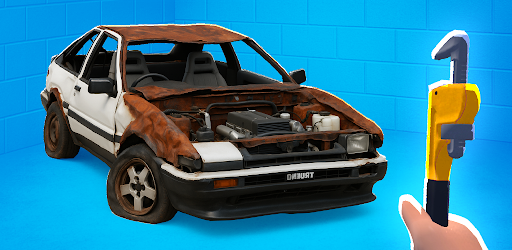
Start with a rusty shell in the middle of nowhere. Armed with nothing but your wrench, your skills, and a passion for machines, you’ll restore abandoned vehicles, tune every part, and turn a forgotten relic into your favorite car. From first-person view to full workshop simulation, this is a real mechanic 3D experience like no other.
🗺️ Explore a Massive Open World
Drive freely through cities, forests, highways, junkyards, tunnels, and industrial zones. Park your car, walk around, even enter buildings — it’s a driving simulator with open world immersion. Whether you prefer drifting through hills or cruising down streets, car driving open world gameplay is fully unlocked.
You’ll uncover garages, old car lots, secret parts stashes, and hidden relics. This is more than just roads — it’s a living world of steel, oil, and adventure.
🔧 Master Realistic Mechanic Workflows
Remove bolts, fix damaged parts, and rebuild cars from the inside out. From car fix basics like tires and brakes to full-on motor repair and engine simulator tuning — everything is interactive.
Install body kits, fix broken cars, replace the gearbox, align the suspension, and finish with a detailed paint job. Even the car interior can be disassembled and restored.
Your garage life starts small — but can grow into a full-blown car factory, where you take on complex builds and multiple clients.
🏗️ Build and Customize
Create your dream ride using real parts. Choose from dozens of vehicle bodies — sedans, muscle cars, off-roaders, Soviet classics, chrome beasts, even concept cars. Then build them up with custom frames, engines, transmissions, wheels, and more.
Customize with spoilers, neon lights, vinyls, metallic paint, chrome car accents, and aggressive tuning. Whether it’s a drift car or a show car — every decision is yours.
Want to craft a heavy metal car with insane torque? Or a lightweight rally monster? Or perhaps build a car from scratch using only junkyard parts? All options are open.
💨 Drift and Drive with Physics
Once your build is ready, hit the road. Engage drift car mechanic mode and test your creation on twisty roads. Feel the difference between front-wheel drive, rear-wheel, and all-wheel configurations.
Test aerodynamics, suspension setups, gear ratios, and torque curves — it’s more than just visuals. This is a car mechanic simulator where performance tuning really matters.
🧰 Features of Last Car: Mechanic Open World:
🧱 Build and restore cars part by part
🔩 Interactive car tools, bolts, and realistic workflows
🧰 Deep car repair, car fix, and motor repair system
🏭 Manage your own car factory and garage
🌍 True open world car game with explorable buildings
🔧 Use engine simulator systems to tweak performance
🧠 Think like a real mechanic with 3D systems
🚗 Drive with full car interior and cockpit views
💥 Try tuning car upgrades: spoilers, nitro, wide wheels
🚘 Enter the car industry from the bottom up
🎨 Paint, modify and build your favorite car from scratch
⚙️ Master the garage life and become a car legend
Why Play?
If you've ever dreamed of being a car mechanic, this is your chance to live it. It's not just about fixing — it's about building a car, one bolt at a time. It’s about transforming rust into beauty, speed, and pride.
You don’t follow a linear story — you create your own path, build your own workshop, discover new car types, and take pride in your creations.
Whether you’re into car customization, car restoration, driving simulator games, or just love the look of a well-tuned engine — Last Car delivers the full fantasy in one immersive package.
🎮 Download Last Car: Mechanic Open World now and dive into the ultimate mobile sandbox for builders, tinkerers, drifters and dreamers.
Start small. Think big. Build it all.
Release
Allows applications to access information about networks.
Allows applications to open network sockets.
Allows an application to write to external storage.
Allows an application to read from external storage.
Allows applications to access information about Wi-Fi networks.
Allows using PowerManager WakeLocks to keep processor from sleeping or screen from dimming.
Allows an application to receive the ACTION_BOOT_COMPLETED that is broadcast after the system finishes booting.