Cartoony - Cartoon Yourself on Windows Pc
Developed By: Gigantic Apps
License: Free
Rating: 4,0/5 - 879 votes
Last Updated: August 04, 2026
App Details
| Version |
1.2.1 |
| Size |
25.8 MB |
| Release Date |
December 07, 25 |
| Category |
Photography Apps |
|
App Permissions:
Allows applications to open network sockets. [see more (6)]
|
|
What's New:
• Bug fixes and performance improvements [see more]
|
|
Description from Developer:
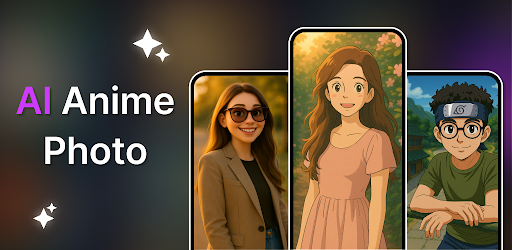
Turn Photo into Cartoon, Anime & Drawing with AI – Photo to Cartoon Yourself!
Turn your selfies and pictures into stunning anime, cartoon, and artistic avatars using advanced... [read more]
|
About this app
On this page you can download Cartoony - Cartoon Yourself and install on Windows PC. Cartoony - Cartoon Yourself is free Photography app, developed by Gigantic Apps. Latest version of Cartoony - Cartoon Yourself is 1.2.1, was released on 2025-12-07 (updated on 2026-08-04). Estimated number of the downloads is more than 10,000. Overall rating of Cartoony - Cartoon Yourself is 4,0. Generally most of the top apps on Android Store have rating of 4+. This app had been rated by 879 users, 527 users had rated it 5*, 105 users had rated it 1*.
How to install Cartoony - Cartoon Yourself on Windows?
Instruction on how to install Cartoony - Cartoon Yourself on Windows 10 Windows 11 PC & Laptop
In this post, I am going to show you how to install Cartoony - Cartoon Yourself on Windows PC by using Android App Player such as BlueStacks, LDPlayer, Nox, KOPlayer, ...
Before you start, you will need to download the APK/XAPK installer file, you can find download button on top of this page. Save it to easy-to-find location.
[Note] You can also download older versions of this app on bottom of this page.
Below you will find a detailed step-by-step guide, but I want to give you a fast overview of how it works. All you need is an emulator that will emulate an Android device on your Windows PC and then you can install applications and use it - you see you're playing it on Android, but this runs not on a smartphone or tablet, it runs on a PC.
If this doesn't work on your PC, or you cannot install, comment here and we will help you!
Step By Step Guide To Install Cartoony - Cartoon Yourself using BlueStacks
- Download and Install BlueStacks at: https://www.bluestacks.com. The installation procedure is quite simple. After successful installation, open the Bluestacks emulator. It may take some time to load the Bluestacks app initially. Once it is opened, you should be able to see the Home screen of Bluestacks.
- Open the APK/XAPK file: Double-click the APK/XAPK file to launch BlueStacks and install the application. If your APK/XAPK file doesn't automatically open BlueStacks, right-click on it and select Open with... Browse to the BlueStacks. You can also drag-and-drop the APK/XAPK file onto the BlueStacks home screen
- Once installed, click "Cartoony - Cartoon Yourself" icon on the home screen to start using, it'll work like a charm :D
[Note 1] For better performance and compatibility, choose BlueStacks 5 Nougat 64-bit read more
[Note 2] about Bluetooth: At the moment, support for Bluetooth is not available on BlueStacks. Hence, apps that require control of Bluetooth may not work on BlueStacks.
How to install Cartoony - Cartoon Yourself on Windows PC using NoxPlayer
- Download & Install NoxPlayer at: https://www.bignox.com. The installation is easy to carry out.
- Drag the APK/XAPK file to the NoxPlayer interface and drop it to install
- The installation process will take place quickly. After successful installation, you can find "Cartoony - Cartoon Yourself" on the home screen of NoxPlayer, just click to open it.
Discussion
(*) is required
Turn Photo into Cartoon, Anime & Drawing with AI – Photo to Cartoon Yourself!
Turn your selfies and pictures into stunning anime, cartoon, and artistic avatars using advanced AI technology! Whether you want to turn yourself into a cartoon, generate anime avatars, or create unique AI Anime photo art, this powerful app makes it instant, fun, and incredibly easy.
Cartoon Yourself or Anime Style inspired Portraits in Seconds!
With just a tap, transform your photo into cartoon drawings, Anime style characters, or dreamy digital paintings. This AI cartoon generator supports a wide range of creative styles including anime, 3D, fantasy, cyberpunk, and more.
Perfect for profile pictures, avatars, social media content, or simply exploring your creativity. No art skills needed – just upload your photo or image, choose a style, and let AI work its magic.
Key Features:
• Photo to Cartoon Yourself – Turn any selfie into a cartoon drawing or animated style
• AI Anime Photo Art Generator – Create anime-style portraits with stunning accuracy
• Cartoon & Anime-Inspired Styles – Reimagine your photos in cinematic and magical looks
• Cartoon Maker & Avatar Creator – Make personalized avatars and share them instantly
• Multiple Art Styles – Includes cartoon, anime, action figure, fantasy, cyberpunk, oil painting & more
• Simple & Fast – User-friendly interface for instant cartoon conversions
• HD Quality Output – Save and share high-resolution images and art
Why Users Love It:
• Cartoon yourself for fun or use as creative profile pictures
• Turn pet pictures, family portraits, or friend selfies into digital cartoons
• Explore multiple drawing and art generator styles in one place
• AI-powered processing ensures detailed and aesthetic results
• Works great for social media, wallpapers, posters, and creative content
• Includes unique anime filters and cartoon-like scenes
How It Works:
• Upload a clear photo, picture, or selfie
• Choose your favourite AI art style – anime, cartoon, fantasy, etc.
• Let the app generate your transformation
• Save or share your artistic AI cartoon image
Whether you're an anime fan, digital art lover, or just curious to see yourself as a cartoon or anime character, this is the ultimate photo to cartoon yourself app. It's also ideal for content creators, artists, and anyone who wants to explore new creative expressions with the help of AI.
From making personalized avatars and anime edits to designing your next profile picture, the possibilities are endless.
No drawing skills? No problem.
Just upload your photo – the AI cartoon generator handles the rest.
This AI cartoon app is not just a simple photo editor—it’s a creative tool that helps you explore different artistic versions of yourself. From anime-inspired avatars to hand-drawn cartoon styles, you can turn any image into a work of art. Whether you're editing a selfie or a pet photo, the results are always fun, unique, and share-worthy.
Discover the easiest way to cartoon yourself with AI. Use the avatar maker to turn your pictures into beautiful art in seconds. This photo editor and cartoon generator is perfect for anyone who loves anime, digital drawings, and creative image transformations. Let your imagination lead—turn every photo into something magical.
Download now and start turning your photos into cartoons, anime portraits, and artistic drawings with a single tap!
• Bug fixes and performance improvements
Allows applications to open network sockets.
Allows applications to access information about networks.
Allows using PowerManager WakeLocks to keep processor from sleeping or screen from dimming.
Allows an application to write to external storage.
Allows read only access to phone state, including the phone number of the device, current cellular network information, the status of any ongoing calls, and a list of any PhoneAccounts registered on the device.
Allows an application to read from external storage.


