Home  /  Strategy Games  / Orbit Planet Defence: TD on Windows Pc

Orbit Planet Defence: TD on Windows Pc

Developed By: Deepliy

License: Free

Rating: 5,0/5 - 1 votes

Last Updated: August 04, 2026

Download on Windows PC

Compatible with Windows 10/11 PC & Laptop

Game Details

Version 1.2.1
Size 68 MB
Release Date January 28, 26
Category Strategy Games

Game Permissions:
Allows applications to open network sockets. [see more (3)]

Description from Developer:
Defend Earth in a 360° space tower defense roguelite where alien waves strike from every direction. Build your orbital arsenal, master upgrade cards, and hold the line across hundr... [read more]

Game preview ([see all 9 screenshots])
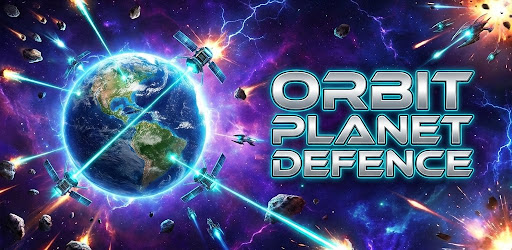
Game preview

About this game

On this page you can download Orbit Planet Defence: TD and play on Windows PC. Orbit Planet Defence: TD is free Strategy game, developed by Deepliy. Latest version of Orbit Planet Defence: TD is 1.2.1, was released on 2026-01-28 (updated on 2026-08-04). Estimated number of the downloads is more than 1,000. Overall rating of Orbit Planet Defence: TD is 5,0. Generally most of the top apps on Android Store have rating of 4+. This game had been rated by 1 users, 1 users had rated it 5*, 0 users had rated it 1*.

How to play Orbit Planet Defence: TD on Windows?

Instruction on how to play Orbit Planet Defence: TD on Windows 10 Windows 11 PC & Laptop

In this post, I am going to show you how to install Orbit Planet Defence: TD on Windows PC by using Android App Player such as BlueStacks, LDPlayer, Nox, KOPlayer, ...

Before you start, you will need to download the APK/XAPK installer file, you can find download button on top of this page. Save it to easy-to-find location.

[Note] You can also download older versions of this game on bottom of this page.

Below you will find a detailed step-by-step guide, but I want to give you a fast overview of how it works. All you need is an emulator that will emulate an Android device on your Windows PC and then you can install applications and use it - you see you're playing it on Android, but this runs not on a smartphone or tablet, it runs on a PC.

If this doesn't work on your PC, or you cannot install, comment here and we will help you!

Step By Step Guide To Play Orbit Planet Defence: TD using BlueStacks

  1. Download and Install BlueStacks at: https://www.bluestacks.com. The installation procedure is quite simple. After successful installation, open the Bluestacks emulator. It may take some time to load the Bluestacks app initially. Once it is opened, you should be able to see the Home screen of Bluestacks.
  2. Open the APK/XAPK file: Double-click the APK/XAPK file to launch BlueStacks and install the application. If your APK/XAPK file doesn't automatically open BlueStacks, right-click on it and select Open with... Browse to the BlueStacks. You can also drag-and-drop the APK/XAPK file onto the BlueStacks home screen
  3. Once installed, click "Orbit Planet Defence: TD" icon on the home screen to start playing, it'll work like a charm :D

[Note 1] For better performance and compatibility, choose BlueStacks 5 Nougat 64-bit read more

[Note 2] about Bluetooth: At the moment, support for Bluetooth is not available on BlueStacks. Hence, apps that require control of Bluetooth may not work on BlueStacks.

How to play Orbit Planet Defence: TD on Windows PC using NoxPlayer

  1. Download & Install NoxPlayer at: https://www.bignox.com. The installation is easy to carry out.
  2. Drag the APK/XAPK file to the NoxPlayer interface and drop it to install
  3. The installation process will take place quickly. After successful installation, you can find "Orbit Planet Defence: TD" on the home screen of NoxPlayer, just click to open it.

Discussion

(*) is required

Download older versions

Other versions available: 1.2.1.

Download Orbit Planet Defence: TD 1.2.1 on Windows PC – 68 MB

Defend Earth in a 360° space tower defense roguelite where alien waves strike from every direction. Build your orbital arsenal, master upgrade cards, and hold the line across hundreds of stages — fully offline.

You are humanity's last command. Hostile fleets close in on the planet, and only your ring of orbital sentinel weapons stands between Earth and extinction. This is tower defense reinvented for a full circular battlefield: no safe flank, no quiet corner — threats orbit in from all 360 degrees at once.

🛰️ A TRUE 360° BATTLEFIELD
Forget straight lanes. Enemies swarm the planet from every angle. Read the whole orbit, anticipate breaches, and reposition your firepower before the line collapses. Every stage is a test of awareness and split-second targeting.

🔫 11 ORBITAL WEAPONS — PICK YOUR LOADOUT OF 6
Command an armory of devastating sci-fi tech and choose six to carry into battle:
• Plasma cannons for relentless sustained fire
• Death rays that melt through armor
• Frost waves to slow and freeze the swarm
• Gravity wells that crush clustered foes
• Drone swarms for autonomous coverage
• Quantum railgun for piercing long-range shots
…and more to unlock and upgrade. Thousands of loadout combinations mean no two runs play the same.

🃏 ROGUELIKE CARD UPGRADES
Every run is a fresh build. Draft powerful card-based upgrades between waves, stack synergies, and shape a strategy on the fly. Roguelite progression rewards bold choices — and punishes the careless.

👾 50+ ALIEN ENEMY TYPES
Face fast swarmers, heavy tank units, erratic anomalies, and elite bosses. Massive boss waves hit every 5 stages, each demanding a new plan. Adapt your defense or be overrun.

🌌 HUNDREDS OF STAGES • 1000+ WAVES
A deep campaign with dozens of stages and over a thousand escalating waves. The difficulty ramps, the swarms grow smarter, and the pressure never lets up.

⚔️ SPECIAL MODES
• Boss Battles — high-stakes duels against colossal foes
• Titan Arena — survive the toughest enemies the galaxy can muster
• Endless Mode — push for your personal best against infinite waves

📈 PERMANENT PROGRESSION • SKILL OVER SPENDING
Earn lasting upgrades that carry between runs and make every session count. This is a skill-based defense game — strategy and reflexes win battles, not your wallet.

✨ STUNNING SCI-FI VFX AT 60 FPS
Explosive particle effects, glowing energy weapons, and smooth 60 FPS combat bring the orbital war to life, backed by immersive space sound design.

📴 PLAY 100% OFFLINE
No internet required. Command your sentinels on a flight, on the subway, or anywhere — the full game is in your pocket.

☁️ GOOGLE PLAY GAMES
Cloud save keeps your progress safe across devices. Unlock achievements and climb the global leaderboards to prove your defense is the one that holds.

🎮 FAIR & PLAYER-FRIENDLY
Free to play with optional purchases, and no interruptive ads during gameplay. Your run, your focus.

Earth is counting on you, Commander. Deploy your orbital sentinels, outsmart the swarm, and turn the tide of the galactic siege.

Tap install and take command of the orbit.

#TowerDefense #SpaceGame #Roguelite #SciFiGames #OfflineGames #AlienShooter #StrategyGames #OrbitDefense #IndieGames #SpaceShooter
Allows applications to open network sockets.
Allows applications to access information about networks.
Allows using PowerManager WakeLocks to keep processor from sleeping or screen from dimming.