Closet Finds- Outfits with AI on Windows Pc
Developed By: Oddloop
License: Free
Rating: 5,0/5 - 1 votes
Last Updated: August 04, 2026
App Details
| Version |
2.0.1 |
| Size |
1 MB |
| Release Date |
July 28, 26 |
| Category |
Lifestyle Apps |
|
What's New:
Changes in subscription and credits [see more]
|
|
Description from Developer:
Is your closet overflowing, but you feel like you never know what to wear?
Closet Finds helps you organize your clothes, discover new combinations, and create personalized outfits... [read more]
|
About this app
On this page you can download Closet Finds- Outfits with AI and install on Windows PC. Closet Finds- Outfits with AI is free Lifestyle app, developed by Oddloop. Latest version of Closet Finds- Outfits with AI is 2.0.1, was released on 2026-07-28 (updated on 2026-08-04). Estimated number of the downloads is more than 1,000. Overall rating of Closet Finds- Outfits with AI is 5,0. Generally most of the top apps on Android Store have rating of 4+. This app had been rated by 1 users, 1 users had rated it 5*, 0 users had rated it 1*.
How to install Closet Finds- Outfits with AI on Windows?
Instruction on how to install Closet Finds- Outfits with AI on Windows 10 Windows 11 PC & Laptop
In this post, I am going to show you how to install Closet Finds- Outfits with AI on Windows PC by using Android App Player such as BlueStacks, LDPlayer, Nox, KOPlayer, ...
Before you start, you will need to download the APK/XAPK installer file, you can find download button on top of this page. Save it to easy-to-find location.
[Note] You can also download older versions of this app on bottom of this page.
Below you will find a detailed step-by-step guide, but I want to give you a fast overview of how it works. All you need is an emulator that will emulate an Android device on your Windows PC and then you can install applications and use it - you see you're playing it on Android, but this runs not on a smartphone or tablet, it runs on a PC.
If this doesn't work on your PC, or you cannot install, comment here and we will help you!
Step By Step Guide To Install Closet Finds- Outfits with AI using BlueStacks
- Download and Install BlueStacks at: https://www.bluestacks.com. The installation procedure is quite simple. After successful installation, open the Bluestacks emulator. It may take some time to load the Bluestacks app initially. Once it is opened, you should be able to see the Home screen of Bluestacks.
- Open the APK/XAPK file: Double-click the APK/XAPK file to launch BlueStacks and install the application. If your APK/XAPK file doesn't automatically open BlueStacks, right-click on it and select Open with... Browse to the BlueStacks. You can also drag-and-drop the APK/XAPK file onto the BlueStacks home screen
- Once installed, click "Closet Finds- Outfits with AI" icon on the home screen to start using, it'll work like a charm :D
[Note 1] For better performance and compatibility, choose BlueStacks 5 Nougat 64-bit read more
[Note 2] about Bluetooth: At the moment, support for Bluetooth is not available on BlueStacks. Hence, apps that require control of Bluetooth may not work on BlueStacks.
How to install Closet Finds- Outfits with AI on Windows PC using NoxPlayer
- Download & Install NoxPlayer at: https://www.bignox.com. The installation is easy to carry out.
- Drag the APK/XAPK file to the NoxPlayer interface and drop it to install
- The installation process will take place quickly. After successful installation, you can find "Closet Finds- Outfits with AI" on the home screen of NoxPlayer, just click to open it.
Discussion
(*) is required
Is your closet overflowing, but you feel like you never know what to wear?
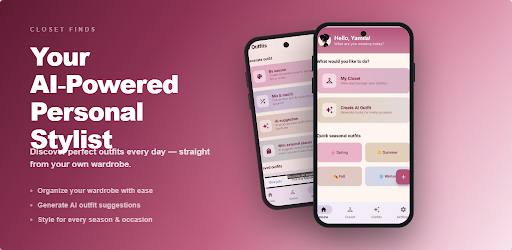
Closet Finds helps you organize your clothes, discover new combinations, and create personalized outfits using the pieces you already own.
Take a photo of each item and let artificial intelligence do the rest. The app identifies its characteristics, organizes your digital closet, and helps you find looks for different occasions, styles, and times of day.
REDISCOVER YOUR CLOSET
Find new ways to combine your clothes without having to buy more.
Closet Finds analyzes the items in your closet and generates outfits tailored to your preferences. You can combine a specific garment, explore different styles, or let the app surprise you with a complete look.
CREATE YOUR DIGITAL CLOSET
Adding items is quick and easy:
• Take a photo of your clothes.
• Artificial intelligence analyzes the garment.
• Review or modify its characteristics.
• Save it to your digital closet.
Organize t-shirts, pants, dresses, jackets, shoes, accessories, and many other categories all in one place.
CREATE OUTFITS WITH YOUR OWN CLOTHES
Choose how you want to create your next look:
• Random Outfit: Discover unexpected combinations.
• Combine a single item: Select what you want to wear and find matching pieces.
• Outfit by occasion: Create looks for work, school, going out, traveling, or enjoying an event.
• Custom Outfit: Indicate your preferences and let the app design a combination for you.
SAVE TIME CHOOSING WHAT TO WEAR
Stop trying on combinations for hours.
With Closet Finds, you can visualize different options before getting dressed, save your favorites, and have inspiration available whenever you need it.
MAKE THE MOST OF THE CLOTHES YOU ALREADY OWN
Many items end up forgotten because we don't know how to combine them.
Closet Finds helps you rediscover clothes you rarely wear, create different looks, and explore the possibilities of your wardrobe.
Before buying anything new, discover all the outfits you can still create with your current clothes.
SAVE YOUR FAVORITE LOOKS
Create your own personal lookbook.
Save the outfits you love most so you can easily find them again when you need inspiration. You can prepare combinations for the week, plan what to pack for a trip, or save ideas for special occasions.
DISCOVER WHICH CLOTHES COULD COMPLETE YOUR WARDROBE
The app can also help you identify pieces that would coordinate with what you already own.
Get ideas to make more informed purchasing decisions and avoid adding hard-to-match items.
YOUR PERSONAL STYLIST ON YOUR PHONE
Closet Finds combines organization, inspiration, and artificial intelligence to help you:
• Decide what to wear faster.
• Create outfits with your own clothes.
• Organize your digital closet.
• Try out new combinations.
• Save your favorite looks.
• Make the most of clothes you hardly ever wear.
• Plan outfits for different occasions.
• Shop more consciously.
PERFECT FOR YOU IF…
• You feel like you always wear the same combinations.
• You want to better organize your clothes.
• You need outfit inspiration.
• You want to plan outfits for the week.
• You're looking to create a capsule wardrobe.
• You want to buy less and get more use out of your clothes.
• You're interested in experimenting with new styles.
GET STARTED IN A FEW STEPS
1. Download Closet Finds.
2. Add a few items.
3. Create your first outfit.
4. Save your favorite combinations.
5. Keep building your digital wardrobe.
You don't need to upload all your clothes to start. Add a few items and discover new combinations from day one.
Your wardrobe has more possibilities than you imagine.
Download Closet Finds and start creating personalized outfits with the clothes you already own.
Changes in subscription and credits