프리미엄 로또번호 AI분석 - 로또블루버드Pro on Windows Pc
Developed By: 블루버드소프트
License: Free
Rating: 5,0/5 - 1 votes
Last Updated: August 04, 2026
App Details
| Version |
1.0.55 |
| Size |
1 MB |
| Release Date |
July 21, 26 |
| Category |
Tools Apps |
|
What's New:
다양한 기기에서의 화면 표시와 전반적인 안정성을 개선했습니다. [see more]
|
|
Description from Developer:
Lotto Bluebird Pro is not just a simple random number generator; it is a premium Lotto combination tool that allows you to generate and manage Lotto number combinations using filte... [read more]
|
About this app
On this page you can download 프리미엄 로또번호 AI분석 - 로또블루버드Pro and install on Windows PC. 프리미엄 로또번호 AI분석 - 로또블루버드Pro is free Tools app, developed by 블루버드소프트. Latest version of 프리미엄 로또번호 AI분석 - 로또블루버드Pro is 1.0.55, was released on 2026-07-21 (updated on 2026-08-04). Estimated number of the downloads is more than 10. Overall rating of 프리미엄 로또번호 AI분석 - 로또블루버드Pro is 5,0. Generally most of the top apps on Android Store have rating of 4+. This app had been rated by 1 users, 1 users had rated it 5*, 0 users had rated it 1*.
How to install 프리미엄 로또번호 AI분석 - 로또블루버드Pro on Windows?
Instruction on how to install 프리미엄 로또번호 AI분석 - 로또블루버드Pro on Windows 10 Windows 11 PC & Laptop
In this post, I am going to show you how to install 프리미엄 로또번호 AI분석 - 로또블루버드Pro on Windows PC by using Android App Player such as BlueStacks, LDPlayer, Nox, KOPlayer, ...
Before you start, you will need to download the APK/XAPK installer file, you can find download button on top of this page. Save it to easy-to-find location.
[Note] You can also download older versions of this app on bottom of this page.
Below you will find a detailed step-by-step guide, but I want to give you a fast overview of how it works. All you need is an emulator that will emulate an Android device on your Windows PC and then you can install applications and use it - you see you're playing it on Android, but this runs not on a smartphone or tablet, it runs on a PC.
If this doesn't work on your PC, or you cannot install, comment here and we will help you!
Step By Step Guide To Install 프리미엄 로또번호 AI분석 - 로또블루버드Pro using BlueStacks
- Download and Install BlueStacks at: https://www.bluestacks.com. The installation procedure is quite simple. After successful installation, open the Bluestacks emulator. It may take some time to load the Bluestacks app initially. Once it is opened, you should be able to see the Home screen of Bluestacks.
- Open the APK/XAPK file: Double-click the APK/XAPK file to launch BlueStacks and install the application. If your APK/XAPK file doesn't automatically open BlueStacks, right-click on it and select Open with... Browse to the BlueStacks. You can also drag-and-drop the APK/XAPK file onto the BlueStacks home screen
- Once installed, click "프리미엄 로또번호 AI분석 - 로또블루버드Pro" icon on the home screen to start using, it'll work like a charm :D
[Note 1] For better performance and compatibility, choose BlueStacks 5 Nougat 64-bit read more
[Note 2] about Bluetooth: At the moment, support for Bluetooth is not available on BlueStacks. Hence, apps that require control of Bluetooth may not work on BlueStacks.
How to install 프리미엄 로또번호 AI분석 - 로또블루버드Pro on Windows PC using NoxPlayer
- Download & Install NoxPlayer at: https://www.bignox.com. The installation is easy to carry out.
- Drag the APK/XAPK file to the NoxPlayer interface and drop it to install
- The installation process will take place quickly. After successful installation, you can find "프리미엄 로또번호 AI분석 - 로또블루버드Pro" on the home screen of NoxPlayer, just click to open it.
Discussion
(*) is required
Lotto Bluebird Pro is not just a simple random number generator; it is a premium Lotto combination tool that allows you to generate and manage Lotto number combinations using filters and analysis functions based on complete combinations.
No ads, no sign-ups, no monthly subscriptions.
Once purchased, you can use it continuously without any complicated procedures.
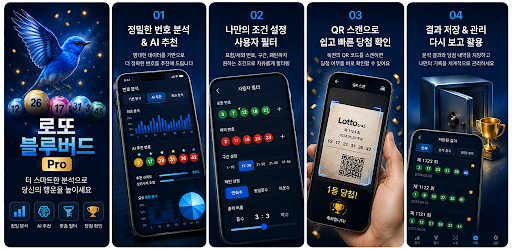
It is designed to allow you to manage everything at once within a single app, from number generation and exclusion extraction to filter analysis, result saving, winning checks, and QR scan verification. It is suitable for users who find the process of manually selecting Lotto numbers cumbersome or who want to create combinations in a more systematic way than simple random recommendations.
[Key Features]
1. Number Generation Based on Complete Combinations
It generates numbers by applying conditions based on all possible Lotto combinations from 1 to 45. Rather than simply picking numbers randomly, it extracts combinations by reflecting the filters and conditions selected by the user. Since various conditions can be applied during the combination generation process, you can create numbers that align with your desired direction more systematically.
2. Quick Start Recommendation Feature
You can generate numbers immediately without complex settings. It offers Basic Recommendations, AI Score Recommendations, and Exclusion Number Recommendations, allowing you to quickly generate combinations in your preferred way depending on the situation. Even first-time users can check the results immediately by simply selecting a recommendation method and choosing the number of combinations, without any separate settings.
3. Exclusion Number Extractor
You can extract numbers to exclude when generating combinations by referring to recent winning number trends and appearance patterns. The extracted exclusion numbers can be used for the "Exclusion Number Recommendation" in Quick Start or for creating user filters, allowing you to create combinations while excluding unwanted numbers. This is a useful auxiliary feature for users who find it difficult to manually select exclusion numbers every time.
4. User Filter Settings
Users can generate combinations by directly selecting conditions. You can create numbers in your desired direction by combining various conditions such as consecutive numbers, odd/even ratios, number ranges, duplicate last digits, past winning history, range distribution, number intervals, and recent appearance trends. You can adjust the filter to suit your style by applying it strongly or partially.
5. AI Score Recommendations
It recommends numbers by prioritizing them based on AI scores among combinations that have passed the Basic Filter. You can refer to scores for each combination, allowing you to compare and select numbers more systematically than simple generation. For combinations generated by AI score recommendations, you can check the scores in the results details view.
6. Four Pillars of Destiny Reference Score
Reference weights can be applied to the combination score based on the Four Pillars of Destiny information entered by the user. The Four Pillars of Destiny are not a condition for disqualifying a combination, but are reflected only as a reference factor in the score. The entered Four Pillars of Destiny information is configured to remain even after app updates unless the user deletes it.
7. Check Latest Winning Numbers and Round Information
You can check the recent Lotto 1st prize numbers and bonus numbers, and also search for the 1st prize numbers of a desired round. Through the info message at the top, you can check key information such as the winning numbers of the latest round, prize money for 1st through 5th place, and the number of winners. The info message can be collapsed or displayed as needed.
8. Previous Round Filter Verification
You can check whether the 1st prize numbers from the previous round passed or failed the current filter criteria. It can be used to check if the filter is too strong or if the current settings are appropriate, and it helps verify the filter direction before generating combinations.
9. Number Distribution Analysis
You can check the distribution and appearance trends of recent winning numbers by number range. By referring to the overall number flow and distribution by range before creating numbers, it helps determine whether a combination is skewed towards a specific range or is balanced.
10. Saving Results and Checking Winnings
Generated combinations can be saved in the Results tab. Saved combinations can be compared with the winning numbers for each draw to check for winnings from 1st to 5th place. For combinations generated using AI score recommendations or user filters, the AI score can also be viewed in the Details section. The saved list is configured to persist even after app updates.
11. Lotto QR Winning Check
You can check your winning status by scanning the QR code of your purchased Lotto ticket. After scanning the QR, the draw number and purchase number are read and compared with the winning numbers within the app, and the winning numbers and purchase numbers are distinguished and displayed for easy viewing. If there is a winning result, you can confirm the outcome via sound effects.
12. Automatic Lighting Assist
When scanning a QR code in a dark environment, the automatic lighting assist feature helps with QR recognition. The light turns off automatically once the winning confirmation is complete. You can easily scan and confirm by simply aligning the QR code area without any separate operation.
13. Photo Saving Function
You can save generated combinations or winning confirmation results as images, making it convenient to record or store numbers separately. This can be utilized in various situations, such as checking numbers before purchase, saving results, or saving images for sharing.
14. Ad-Free Premium Configuration
Unlike free ad-supported apps, you can use the app without screen-blocking ads or unnecessary sign-up procedures. The screen layout is neatly organized to allow you to focus on necessary functions, and the app is configured as a premium plan that allows access to key features after a one-time purchase.
[How to Use]
When you need numbers quickly, you can generate combinations by selecting the recommended method in Quick Start. If you want more precise control, you can directly select your desired conditions in the User Filter. If you wish to exclude specific numbers, use the exclusion number generator. You can save the generated numbers to the results tab for management by draw. After purchasing an actual lottery ticket, you can use the QR scan function to compare your purchased numbers with the winning numbers to verify your win.
[Recommended for:]
- Those who want a more systematic combination generator than simple random number generation
- Those who want to create numbers by manually adjusting various conditions
- Those who want to create combinations that incorporate exclusion numbers
- Those who want to save generated numbers and check for wins by draw
- Those who want to quickly check the winning status of their purchased tickets via QR scan
- Those who want a paid premium Lotto app without ads
[Notice]
Lotto Bluebird Pro is an analysis and management tool designed to assist with Lotto number generation and winning verification. This app does not guarantee a win, and the generated numbers and exclusion numbers should be used for reference only. The QR winning verification results are for convenience; please verify your final winning status and prize payout based on the official Donghang Lottery standards and your physical ticket.
** Lotto Bluebird Pro is a premium lottery combination app that allows you to manage number generation, exclusion number extraction, filter analysis, result saving, winning checks, and QR scanning all at once.
다양한 기기에서의 화면 표시와 전반적인 안정성을 개선했습니다.