Home  /  Tools Apps  / QueryDock for Redis on Windows Pc

QueryDock for Redis on Windows Pc

Developed By: Sia Makerlab

License: Free

Rating: 5,0/5 - 1 votes

Last Updated: August 04, 2026

Download on Windows PC

Compatible with Windows 10/11 PC & Laptop

App Details

Version 0.93.28
Size 1 MB
Release Date July 28, 26
Category Tools Apps

What's New:
Overview adds quick actions for key browsing, commands, Workbench, and Search, and every tool screen now shows the active server, database, and read-only state... [see more]

Description from Developer:
QueryDock for Redis is an independent Android client for exploring, querying, analyzing, and operating Redis environments with confidence.

🔌 Connect to your infrastructure
• Direc... [read more]

App preview ([see all 25 screenshots])
App preview

About this app

On this page you can download QueryDock for Redis and install on Windows PC. QueryDock for Redis is free Tools app, developed by Sia Makerlab. Latest version of QueryDock for Redis is 0.93.28, was released on 2026-07-28 (updated on 2026-08-04). Estimated number of the downloads is more than 1. Overall rating of QueryDock for Redis is 5,0. Generally most of the top apps on Android Store have rating of 4+. This app had been rated by 1 users, 1 users had rated it 5*, 0 users had rated it 1*.

How to install QueryDock for Redis on Windows?

Instruction on how to install QueryDock for Redis on Windows 10 Windows 11 PC & Laptop

In this post, I am going to show you how to install QueryDock for Redis on Windows PC by using Android App Player such as BlueStacks, LDPlayer, Nox, KOPlayer, ...

Before you start, you will need to download the APK/XAPK installer file, you can find download button on top of this page. Save it to easy-to-find location.

[Note] You can also download older versions of this app on bottom of this page.

Below you will find a detailed step-by-step guide, but I want to give you a fast overview of how it works. All you need is an emulator that will emulate an Android device on your Windows PC and then you can install applications and use it - you see you're playing it on Android, but this runs not on a smartphone or tablet, it runs on a PC.

If this doesn't work on your PC, or you cannot install, comment here and we will help you!

Step By Step Guide To Install QueryDock for Redis using BlueStacks

  1. Download and Install BlueStacks at: https://www.bluestacks.com. The installation procedure is quite simple. After successful installation, open the Bluestacks emulator. It may take some time to load the Bluestacks app initially. Once it is opened, you should be able to see the Home screen of Bluestacks.
  2. Open the APK/XAPK file: Double-click the APK/XAPK file to launch BlueStacks and install the application. If your APK/XAPK file doesn't automatically open BlueStacks, right-click on it and select Open with... Browse to the BlueStacks. You can also drag-and-drop the APK/XAPK file onto the BlueStacks home screen
  3. Once installed, click "QueryDock for Redis" icon on the home screen to start using, it'll work like a charm :D

[Note 1] For better performance and compatibility, choose BlueStacks 5 Nougat 64-bit read more

[Note 2] about Bluetooth: At the moment, support for Bluetooth is not available on BlueStacks. Hence, apps that require control of Bluetooth may not work on BlueStacks.

How to install QueryDock for Redis on Windows PC using NoxPlayer

  1. Download & Install NoxPlayer at: https://www.bignox.com. The installation is easy to carry out.
  2. Drag the APK/XAPK file to the NoxPlayer interface and drop it to install
  3. The installation process will take place quickly. After successful installation, you can find "QueryDock for Redis" on the home screen of NoxPlayer, just click to open it.

Discussion

(*) is required

Download older versions

Other versions available: 0.93.28.

Download QueryDock for Redis 0.93.28 on Windows PC – 1 MB

QueryDock for Redis is an independent Android client for exploring, querying, analyzing, and operating Redis environments with confidence.

🔌 Connect to your infrastructure
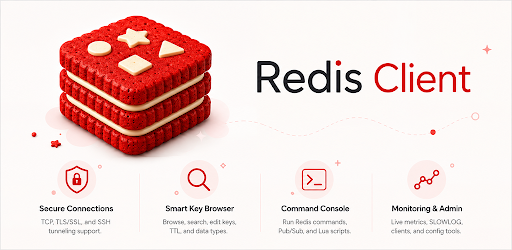
• Direct, TLS, and SSH tunnel connections
• Redis Cluster routing and Sentinel primary discovery
• Saved connection profiles with secure credential handling
• Read-only mode for safer investigation

🔎 Explore every key with context
• Binary-safe key browsing across logical databases
• String, Hash, List, Set, Sorted Set, Stream, JSON, and Redis 8 Vector Set workflows
• TTL, memory usage, encoding, idle time, and frequency inspection
• Structured SCAN filters with bounded progress and partial-result recovery

⌨️ Query with purpose
• Console and Workbench for command execution
• Command documentation, guided examples, autocomplete, and syntax-aware editing
• Explicit confirmation for high-impact commands
• Saved, encrypted snippets only when you choose to keep them

📊 Understand server behavior
• Health overview with operational findings
• Live metrics for command rate, memory, clients, and cache hit rate
• Keyspace analysis, large-key sampling, TTL coverage, SLOWLOG, latency, and bounded MONITOR profiling
• Read-only Incident Mode with redacted export previews

🔁 Move and compare data
• Binary-safe DUMP/RESTORE transfers with TTL preservation
• Cross-server comparison and selected-key migration
• JSONL and CSV import/export through Android's document picker
• Dry runs, collision policies, cancellation, and failed-record retry

🧭 Search and inspect Redis 8
• RediSearch index creation, schema review, FT.SEARCH, FT.EXPLAIN, and FT.PROFILE
• Vector Set element, attribute, embedding, and similarity workflows
• Capability-aware fallback for different Redis server versions

🛡️ Designed for responsible operations
• Encrypted local secrets and passphrase-protected profile backup
• Biometric protection options
• No implicit upload of server data
• AI assistance is optional, user-configured, previewed before sending, and produces editable drafts without automatic execution

📱 Built for Android workflows
• Adaptive layouts for phones, tablets, foldables, landscape, keyboard, and pointer input
• English and Korean interface
• Dark theme and accessibility-aware controls

QueryDock for Redis is an independent product and is not affiliated with, endorsed by, or sponsored by Redis Ltd. Redis is a trademark of Redis Ltd.
Overview adds quick actions for key browsing, commands, Workbench, and Search, and every tool screen now shows the active server, database, and read-only state.

Tablets and foldables can collapse the server list into a compact rail. Rotation no longer re-asks for biometric unlock, copied values are marked sensitive and cleared more reliably, and lists stay smoother while loading.

Also fixes Sentinel monitoring commands sent to the wrong endpoint and garbled non-English error messages.