Spring Live Wallpaper on Windows Pc
Developed By: MISVI Apps for Your Phone
License: Free
Rating: 4,0/5 - 17 votes
Last Updated: August 05, 2026
App Details
| Version |
1.0.4 |
| Size |
5.7 MB |
| Release Date |
July 24, 18 |
| Category |
Personalization Apps |
|
App Permissions:
Allows an application to write to external storage. [see more (7)]
|
|
What's New:
🔔 User interface improved!🔔 Minor bugs fixed!🔔 Other enhancements!🔔 Stay tuned for future updates, we are bringing you more live wallpapers and other fun apps... [see more]
|
|
Description from Developer:
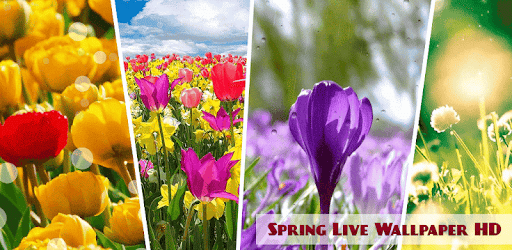
💐 Feel the spring awakening on your screen with the best collection of free nature wallpapers! Gaze upon the marvelous spring flowers dancing on your desktop – download Spring Live... [read more]
|
About this app
On this page you can download Spring Live Wallpaper and install on Windows PC. Spring Live Wallpaper is free Personalization app, developed by MISVI Apps for Your Phone. Latest version of Spring Live Wallpaper is 1.0.4, was released on 2018-07-24 (updated on 2026-08-05). Estimated number of the downloads is more than 5,000. Overall rating of Spring Live Wallpaper is 4,0. Generally most of the top apps on Android Store have rating of 4+. This app had been rated by 17 users, 9 users had rated it 5*, 1 users had rated it 1*.
How to install Spring Live Wallpaper on Windows?
Instruction on how to install Spring Live Wallpaper on Windows 10 Windows 11 PC & Laptop
In this post, I am going to show you how to install Spring Live Wallpaper on Windows PC by using Android App Player such as BlueStacks, LDPlayer, Nox, KOPlayer, ...
Before you start, you will need to download the APK/XAPK installer file, you can find download button on top of this page. Save it to easy-to-find location.
[Note] You can also download older versions of this app on bottom of this page.
Below you will find a detailed step-by-step guide, but I want to give you a fast overview of how it works. All you need is an emulator that will emulate an Android device on your Windows PC and then you can install applications and use it - you see you're playing it on Android, but this runs not on a smartphone or tablet, it runs on a PC.
If this doesn't work on your PC, or you cannot install, comment here and we will help you!
Step By Step Guide To Install Spring Live Wallpaper using BlueStacks
- Download and Install BlueStacks at: https://www.bluestacks.com. The installation procedure is quite simple. After successful installation, open the Bluestacks emulator. It may take some time to load the Bluestacks app initially. Once it is opened, you should be able to see the Home screen of Bluestacks.
- Open the APK/XAPK file: Double-click the APK/XAPK file to launch BlueStacks and install the application. If your APK/XAPK file doesn't automatically open BlueStacks, right-click on it and select Open with... Browse to the BlueStacks. You can also drag-and-drop the APK/XAPK file onto the BlueStacks home screen
- Once installed, click "Spring Live Wallpaper" icon on the home screen to start using, it'll work like a charm :D
[Note 1] For better performance and compatibility, choose BlueStacks 5 Nougat 64-bit read more
[Note 2] about Bluetooth: At the moment, support for Bluetooth is not available on BlueStacks. Hence, apps that require control of Bluetooth may not work on BlueStacks.
How to install Spring Live Wallpaper on Windows PC using NoxPlayer
- Download & Install NoxPlayer at: https://www.bignox.com. The installation is easy to carry out.
- Drag the APK/XAPK file to the NoxPlayer interface and drop it to install
- The installation process will take place quickly. After successful installation, you can find "Spring Live Wallpaper" on the home screen of NoxPlayer, just click to open it.
Discussion
(*) is required
💐 Feel the spring awakening on your screen with the best collection of free nature wallpapers! Gaze upon the marvelous spring flowers dancing on your desktop – download Spring Live Wallpaper and be mesmerized by the enchanting beauty of lovely fresh flowers and natural plants that this spring app provides for free! Everything is more beautiful in the spring, so why wouldn't you get this flower wallpaper download and embellish your phone and tablet with a single jasmine or orchid flower! If you prefer the rose flower or tulips, do not worry, our “spring wallpaper free” offers you these and many other types of flowers and other beautiful nature wallpapers! Make your own spring fest on the screen of your phone and tablet - my photo flower live wallpaper lets you add your own spring photos from the gallery and use our animated particles! Download this flower wallpaper app and let the magic of spring into your heart!
💐 HOW IT WORKS:
➡ Find “Spring Live Wallpaper” in the list of your installed apps;
➡ Open the “rain live wallpaper” and click on the Settings button;
➡ Find your favorite spring live wallpapers among many nature backgrounds; click on the HD background to use all the options that this “free spring wallpaper” offers!
➡ Wallpaper list: Click on your favorite “spring wallpapers” or scroll down to use the photos from your gallery!
➡ Custom photo option: If you would like to try the photo from your gallery with our animated rain, snow and other particles, use the custom photo option at the end of the wallpaper list!
➡ Left/right scroll: Scroll the “spring wallpaper” left or right to choose your favorite backgrounds!
➡ Gear icon: Activate the settings of the “flower live wallpaper”!
➡ Particle icon: Choose among four types of animated particles: random floating particles, animated stars, rain and snow!
➡ Speed icon: Set the speed of the animated particles to slow, normal or fast!
➡ Particle density icon: Choose the amount of animated particles!
➡ Direction icon: Set the direction of the particles (left, right, up, down)!
➡ Play button: Start the animation of your new “beautiful flower wallpaper”!
➡ Set as wallpaper: Set the spring flowers wallpaper as your new “live wallpaper”!
💐 Spring Live Wallpaper is the best spring mobile app with many nature wallpapers and backgrounds that you can find on the market! Choose a spring flowers live wallpaper or beautify your screen with lovely meadows and flower fields – the loveliness of this spring nature wallpaper will leave you in awe! If you have been searching for flower wallpapers for free download, search no more – get this spring wallpaper HD and enjoy your own flower arrangements and beautiful pictures of nature on the screen of your phone and tablet! Springtime is the best time of the year, the time when everything blossoms and blooms, so why wouldn't you get this spring live wallpaper HD and dress your screen in all the colors of the rainbow! This flower wallpaper 2017 has everything that you need to make the prettiest flower crown on your screen – choose from our list of amazing spring flowers wallpapers or select a photo from your gallery and watch how many tiny pink and white flowers cover your desktop wallpaper! Download Spring Live Wallpaper and bathe your screen in warm sun rays of the magical spring season!
🔔 User interface improved!
🔔 Minor bugs fixed!
🔔 Other enhancements!
🔔 Stay tuned for future updates, we are bringing you more live wallpapers and other fun apps for your phone!
Allows an application to write to external storage.
Allows an application to receive the ACTION_BOOT_COMPLETED that is broadcast after the system finishes booting.
Allows access to the vibrator.
Allows applications to open network sockets.
Allows applications to set the wallpaper.
Allows applications to access information about networks.
Allows an application to read from external storage.


