Avaz AAC India on Windows Pc
Developed By: Avaz Inc.
License: Free
Rating: 3,5/5 - 298 votes
Last Updated: August 05, 2026
App Details
| Version |
8.0.1 |
| Size |
80.8 MB |
| Release Date |
June 10, 25 |
| Category |
Communication Apps |
|
App Permissions:
Allows applications to open network sockets. [see more (11)]
|
|
What's New:
- Bug Fixes- Better handling of large images and GIFs- Stronger password security and minor usability fixes [see more]
|
|
Description from Developer:
Avaz AAC is an Augmentative and Alternative Communication App that empowers children & adults with Autism, Cerebral Palsy, Down Syndrome, Aphasia, Apraxia and individuals with... [read more]
|
About this app
On this page you can download Avaz AAC India and install on Windows PC. Avaz AAC India is free Communication app, developed by Avaz Inc.. Latest version of Avaz AAC India is 8.0.1, was released on 2025-06-10 (updated on 2026-08-05). Estimated number of the downloads is more than 100,000. Overall rating of Avaz AAC India is 3,5. Generally most of the top apps on Android Store have rating of 4+. This app had been rated by 298 users, 165 users had rated it 5*, 99 users had rated it 1*.
How to install Avaz AAC India on Windows?
Instruction on how to install Avaz AAC India on Windows 10 Windows 11 PC & Laptop
In this post, I am going to show you how to install Avaz AAC India on Windows PC by using Android App Player such as BlueStacks, LDPlayer, Nox, KOPlayer, ...
Before you start, you will need to download the APK/XAPK installer file, you can find download button on top of this page. Save it to easy-to-find location.
[Note] You can also download older versions of this app on bottom of this page.
Below you will find a detailed step-by-step guide, but I want to give you a fast overview of how it works. All you need is an emulator that will emulate an Android device on your Windows PC and then you can install applications and use it - you see you're playing it on Android, but this runs not on a smartphone or tablet, it runs on a PC.
If this doesn't work on your PC, or you cannot install, comment here and we will help you!
Step By Step Guide To Install Avaz AAC India using BlueStacks
- Download and Install BlueStacks at: https://www.bluestacks.com. The installation procedure is quite simple. After successful installation, open the Bluestacks emulator. It may take some time to load the Bluestacks app initially. Once it is opened, you should be able to see the Home screen of Bluestacks.
- Open the APK/XAPK file: Double-click the APK/XAPK file to launch BlueStacks and install the application. If your APK/XAPK file doesn't automatically open BlueStacks, right-click on it and select Open with... Browse to the BlueStacks. You can also drag-and-drop the APK/XAPK file onto the BlueStacks home screen
- Once installed, click "Avaz AAC India" icon on the home screen to start using, it'll work like a charm :D
[Note 1] For better performance and compatibility, choose BlueStacks 5 Nougat 64-bit read more
[Note 2] about Bluetooth: At the moment, support for Bluetooth is not available on BlueStacks. Hence, apps that require control of Bluetooth may not work on BlueStacks.
How to install Avaz AAC India on Windows PC using NoxPlayer
- Download & Install NoxPlayer at: https://www.bignox.com. The installation is easy to carry out.
- Drag the APK/XAPK file to the NoxPlayer interface and drop it to install
- The installation process will take place quickly. After successful installation, you can find "Avaz AAC India" on the home screen of NoxPlayer, just click to open it.
Discussion
(*) is required
Avaz AAC is an Augmentative and Alternative Communication App that empowers children & adults with Autism, Cerebral Palsy, Down Syndrome, Aphasia, Apraxia and individuals with any other condition/cause of speech delays, with a voice of their own.Avaz assists individuals facing speech delays and difficulties in expressing themselves.
“My daughter has nearly mastered navigation, so much so that one day she brought it to me to show me she wanted Taco Bell for lunch. This made me cry. My child had a voice for the first time. Thank you for being the one to give my daughter that "voice". - Amy Kinderman
Exciting Feature Highlights!
- YouTube videos can be played with just a tap.
- Add dynamic GIFs to messages for more expressive communication.
- Upload personalized audio files for a tailored communication experience and many more!
- Adjust grid sizes for clearer visibility on specific page sets, enhancing user experience.
- Ensure consistent motor planning by linking a folder inside any pageset for context building; customize the visible words for each pageset.
- Organize vocabulary alphabetically for easy navigation and locating words.
Starting with a simple touch of words and progressing to learning to create sentences, users can express themselves at any place and at any time.
Try Avaz AAC's free 14-day trial without adding credit card details! Choose from our affordable monthly, yearly, and lifetime subscription plans to continue enjoying all of the amazing features.
In addition to English, Avaz is available in multiple Indian languages, including Hindi, Tamil, Telugu, Malayalam, Marathi, and Kannada. The user will be able to communicate in both English and their native language.
If you’re new to AAC, don’t worry! Visit www.avazapp.com for beginner-friendly articles to help you get started. Connect with our passionate Avaz community on Facebook and other social media platforms.
Avaz App supports reducing behavioural issues by offering expert guidance through Teletherapy sessions from the comfort of your home.
Picture mode:
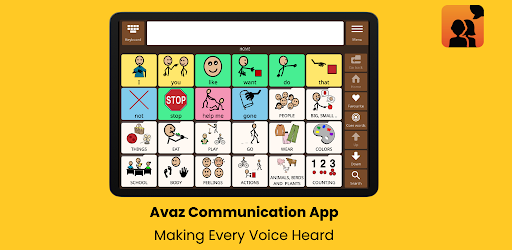
Vocabulary is organised in a consistent pattern to facilitate quick access and promote motor memory in users.
Colour-coded words with the Fitzgerald key allow easy correlation of part of speech with special ed classroom materials.
Enlarging words when tapped on for visual reinforcement.
Option for advanced users to hide pictures and adjust the number of displayed pictures.
Add and personalise multiple words and folders in an instant.
A quick search for words with path visibility.
Keyboard mode:
Create sentences with just a few taps with a powerful prediction system.
Prediction of words and phrases along with predicting the present and following words, as well as options for phonetically spelled words.
Favourites folder for saving frequently-used phrases.
Other Key Features:
Share folders with other Avaz AAC users.
Get the caregiver's attention with the ‘mistake’ & ‘alert’ buttons.
Access FAQs and the support desk within the app.
Add a password to Settings & Edit mode.
Sharing messages on Email, WhatsApp, and other popular social media platforms effortlessly!
Introducing auto backup for worry-free vocabulary progress. Simply choose how often you want your vocabulary progress backed up with our auto-backup interval selection option. Never lose your progress again!
We understand our users have different preferences for cloud storage, so we made it easy to back up your vocabulary to your preferred platform, including popular ones like Google Drive.
Additionally, Avaz lets you create and print your own Avaz book to use at any time.With regular app updates and support tools, Avaz evolves with every transition the user experiences.
Now is the time to give your loved ones the power to communicate!
Team Avaz is happy to assist in configuring the app and answering queries. Reach out to us at support@avazapp.com
- Bug Fixes
- Better handling of large images and GIFs
- Stronger password security and minor usability fixes
Allows applications to open network sockets.
Required to be able to access the camera device.
Allows an application to record audio.
Allows access to the list of accounts in the Accounts Service.
Allows applications to access information about Wi-Fi networks.
Allows applications to change Wi-Fi connectivity state.
Allows applications to access information about networks.
Allows using PowerManager WakeLocks to keep processor from sleeping or screen from dimming.
Allows an application to modify global audio settings.
Allows access to the vibrator.
Allows an application to receive the ACTION_BOOT_COMPLETED that is broadcast after the system finishes booting.


