Huge Digital Clock Widget on Windows Pc
Developed By: Riccardo Camattari
License: Free
Rating: 4,6/5 - 110.361 votes
Last Updated: August 05, 2026
App Details
| Version |
10.0.1 |
| Size |
36.1 MB |
| Release Date |
September 15, 25 |
| Category |
Lifestyle Apps |
|
App Permissions:
Permission an application must hold in order to use ACTION_REQUEST_IGNORE_BATTERY_OPTIMIZATIONS. [see more (11)]
|
|
What's New:
🛠️ Improved general app stability🚫 Better error handling for edge cases🧪 General enhancements for app optimization📊 Optimized app behavior based on survey... [see more]
|
|
Description from Developer:
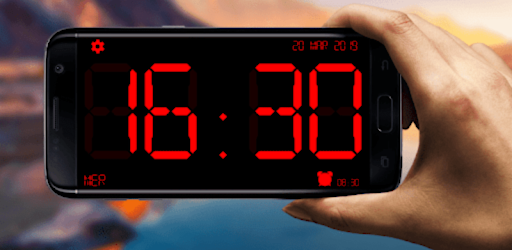
Huge Digital Clock With Seconds – The Best Watch Display You Can Get!Now you can turn your device into an easy-to-read time hub with the Huge Digital Clock With Seconds app. Not on... [read more]
|
About this app
On this page you can download Huge Digital Clock Widget and install on Windows PC. Huge Digital Clock Widget is free Lifestyle app, developed by Riccardo Camattari. Latest version of Huge Digital Clock Widget is 10.0.1, was released on 2025-09-15 (updated on 2026-08-05). Estimated number of the downloads is more than 10,000,000. Overall rating of Huge Digital Clock Widget is 4,6. Generally most of the top apps on Android Store have rating of 4+. This app had been rated by 110,361 users, 91,991 users had rated it 5*, 5,824 users had rated it 1*.
How to install Huge Digital Clock Widget on Windows?
Instruction on how to install Huge Digital Clock Widget on Windows 10 Windows 11 PC & Laptop
In this post, I am going to show you how to install Huge Digital Clock Widget on Windows PC by using Android App Player such as BlueStacks, LDPlayer, Nox, KOPlayer, ...
Before you start, you will need to download the APK/XAPK installer file, you can find download button on top of this page. Save it to easy-to-find location.
[Note] You can also download older versions of this app on bottom of this page.
Below you will find a detailed step-by-step guide, but I want to give you a fast overview of how it works. All you need is an emulator that will emulate an Android device on your Windows PC and then you can install applications and use it - you see you're playing it on Android, but this runs not on a smartphone or tablet, it runs on a PC.
If this doesn't work on your PC, or you cannot install, comment here and we will help you!
Step By Step Guide To Install Huge Digital Clock Widget using BlueStacks
- Download and Install BlueStacks at: https://www.bluestacks.com. The installation procedure is quite simple. After successful installation, open the Bluestacks emulator. It may take some time to load the Bluestacks app initially. Once it is opened, you should be able to see the Home screen of Bluestacks.
- Open the APK/XAPK file: Double-click the APK/XAPK file to launch BlueStacks and install the application. If your APK/XAPK file doesn't automatically open BlueStacks, right-click on it and select Open with... Browse to the BlueStacks. You can also drag-and-drop the APK/XAPK file onto the BlueStacks home screen
- Once installed, click "Huge Digital Clock Widget" icon on the home screen to start using, it'll work like a charm :D
[Note 1] For better performance and compatibility, choose BlueStacks 5 Nougat 64-bit read more
[Note 2] about Bluetooth: At the moment, support for Bluetooth is not available on BlueStacks. Hence, apps that require control of Bluetooth may not work on BlueStacks.
How to install Huge Digital Clock Widget on Windows PC using NoxPlayer
- Download & Install NoxPlayer at: https://www.bignox.com. The installation is easy to carry out.
- Drag the APK/XAPK file to the NoxPlayer interface and drop it to install
- The installation process will take place quickly. After successful installation, you can find "Huge Digital Clock Widget" on the home screen of NoxPlayer, just click to open it.
Discussion
(*) is required
Huge Digital Clock With Seconds – The Best Watch Display You Can Get!Now you can turn your device into an easy-to-read time hub with the Huge Digital Clock With Seconds app. Not only does it work well as an app for your nightstand companion, but it can also be used as a stylish centerpiece on your desk. With the app, time is at your fingertips. Check the time anytime or anywhere because it's modern design puts time checking in good taste.
📄 Key Features 📄
⏰ Visibility while looking - Huge Digital Clock With Seconds;
🛏️ Ideal for your bedside, this Big Clock Display: Digital Nightstand Clock’s display offers clear;
📅 Real-time date and time details are displayed on the Big Digital Clock Display: Time and Date;
🔔 Customize your large digital alarm clock for the tones you wish to set for your alarm;
🕰️ You can wear the classic and modern together through the combo of an Analog Clock and Digital Watch;
📲 Anytime you need to look at an Analog Clock Or Digital Watch;
🎨 Experience the freedom of customization through Adjustable colors and fonts;
🌓 Dimmable brightness for night mode;
🔋 Auto-close settings and battery saver options make this device more convenient;
🌤️ The device also works as a battery indicator and weather display;
🔁 Anti burn motion design;
📐 (12h/24h) Adjustable format and size;
📱 Big Clock Display: Digital Nightstand Clock can be used with portrait and landscape modes.
Display is Perfect at Any Time!The Big Clock Display: Digital Nightstand Clock is perfect for those looking for a bedside watch. During the day or night, the vivid numbers are designed to be easily visible from afar. The Always on Display Clock: Widget Clock offers a clear view of time, while being easy on the eyes at nighttime.
All-in-One Time Display: 🕑
You'll never miss a second with The Big Digital Clock Display: Time And Date. This digital watch not guarantees accurate time checks, but also shows the full month day. It can be adjusted in font, size, and position My Large Digital Clock Alarm is easy to transform, whether you are at home, at work, or traveling.
Smart and Stylish Alarm Setup: ⌚
The Large Digital Clock Alarm can be used for effective and reliable wake up calls. You can pair it with night mode and charging mode so the app starts when the phone is plugged in. Together with the Always on Display Clock: Widget Clock, this device serves as an effective bedside alarm system and transforms easily along with your routine.
Custom Widgets and Smart Features: ⏰
Unlimited access custom features are available with the Always on Display Clock: Widget Clock. Users can create a home screen widget, set brightness levels, and even turn on the anti-burn features for long-term use. The Big Digital Clock Display: Time And Date helps you monitor battery level and allows you to check the weather in an instant.
Maximize your timekeeping with Huge Digital Clock With Seconds!Looking for a full screen time display, a desk centerpiece, or a nightstand solution? The Huge Digital Clock With Seconds offers all those solutions. This app never disappoints, whether it is Analog Clock And Digital Watch, Big Digital Clock Display: Time And Date, or large digital clock alarm.
Use of Foreground Service Permission:
The foreground service permission is needed to display a user-controlled timer widget over all apps without interruption. It ensures the widget remains active and visible even when the user switches to other applications. This allows for a seamless, always-accessible time display experience.
🛠️ Improved general app stability
🚫 Better error handling for edge cases
🧪 General enhancements for app optimization
📊 Optimized app behavior based on survey feedback
Permission an application must hold in order to use ACTION_REQUEST_IGNORE_BATTERY_OPTIMIZATIONS.
Allows access to the vibrator.
Allows applications to open network sockets.
Allows applications to access information about Wi-Fi networks.
Allows applications to access information about networks.
Allows an app to access precise location.
Allows an app to access approximate location.
Allows applications to set the wallpaper.
Allows an app to create windows using the type TYPE_APPLICATION_OVERLAY, shown on top of all other apps.
Allows an application to receive the ACTION_BOOT_COMPLETED that is broadcast after the system finishes booting.
Allows using PowerManager WakeLocks to keep processor from sleeping or screen from dimming.


