Al Quran (Tafsir & by Word) on Windows Pc
Developed By: Greentech Apps Foundation
License: Free
Rating: 4,9/5 - 391.862 votes
Last Updated: August 04, 2026
App Details
| Version |
1.35.1 |
| Size |
56.4 MB |
| Release Date |
January 29, 26 |
| Category |
Books & Reference Apps |
|
App Permissions:
Allows applications to open network sockets. [see more (5)]
|
|
What's New:
We are working continuously to improve the Al Quran (Tafsir & by Word) app.Here are some of the latest updates:✨ Refreshed planner with guided plans🚀... [see more]
|
|
Description from Developer:
Want to strengthen your connection with the Quran? Try the Al Quran app, used by 8M+ people worldwide and supporting 66 languages. Completely free & no ads!
Understand every... [read more]
|
About this app
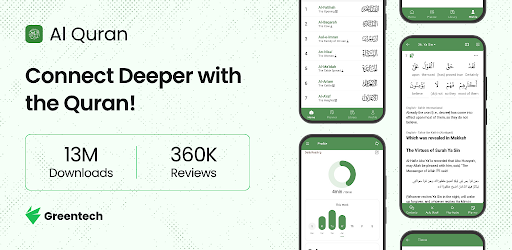
On this page you can download Al Quran (Tafsir & by Word) and install on Windows PC. Al Quran (Tafsir & by Word) is free Books & Reference app, developed by Greentech Apps Foundation. Latest version of Al Quran (Tafsir & by Word) is 1.35.1, was released on 2026-01-29 (updated on 2026-08-04). Estimated number of the downloads is more than 10,000,000. Overall rating of Al Quran (Tafsir & by Word) is 4,9. Generally most of the top apps on Android Store have rating of 4+. This app had been rated by 391,862 users, 368,699 users had rated it 5*, 6,149 users had rated it 1*.
How to install Al Quran (Tafsir & by Word) on Windows?
Instruction on how to install Al Quran (Tafsir & by Word) on Windows 10 Windows 11 PC & Laptop
In this post, I am going to show you how to install Al Quran (Tafsir & by Word) on Windows PC by using Android App Player such as BlueStacks, LDPlayer, Nox, KOPlayer, ...
Before you start, you will need to download the APK/XAPK installer file, you can find download button on top of this page. Save it to easy-to-find location.
[Note] You can also download older versions of this app on bottom of this page.
Below you will find a detailed step-by-step guide, but I want to give you a fast overview of how it works. All you need is an emulator that will emulate an Android device on your Windows PC and then you can install applications and use it - you see you're playing it on Android, but this runs not on a smartphone or tablet, it runs on a PC.
If this doesn't work on your PC, or you cannot install, comment here and we will help you!
Step By Step Guide To Install Al Quran (Tafsir & by Word) using BlueStacks
- Download and Install BlueStacks at: https://www.bluestacks.com. The installation procedure is quite simple. After successful installation, open the Bluestacks emulator. It may take some time to load the Bluestacks app initially. Once it is opened, you should be able to see the Home screen of Bluestacks.
- Open the APK/XAPK file: Double-click the APK/XAPK file to launch BlueStacks and install the application. If your APK/XAPK file doesn't automatically open BlueStacks, right-click on it and select Open with... Browse to the BlueStacks. You can also drag-and-drop the APK/XAPK file onto the BlueStacks home screen
- Once installed, click "Al Quran (Tafsir & by Word)" icon on the home screen to start using, it'll work like a charm :D
[Note 1] For better performance and compatibility, choose BlueStacks 5 Nougat 64-bit read more
[Note 2] about Bluetooth: At the moment, support for Bluetooth is not available on BlueStacks. Hence, apps that require control of Bluetooth may not work on BlueStacks.
How to install Al Quran (Tafsir & by Word) on Windows PC using NoxPlayer
- Download & Install NoxPlayer at: https://www.bignox.com. The installation is easy to carry out.
- Drag the APK/XAPK file to the NoxPlayer interface and drop it to install
- The installation process will take place quickly. After successful installation, you can find "Al Quran (Tafsir & by Word)" on the home screen of NoxPlayer, just click to open it.
Discussion
(*) is required
Want to strengthen your connection with the Quran? Try the Al Quran app, used by 8M+ people worldwide and supporting 66 languages. Completely free & no ads!
Understand every verse with Tafsir, word-by-word meanings, and grammar, listen to beautiful recitations, follow tajweed, and read from familiar Mushaf pages.
Discover how this app helps you connect with the Quran more meaningfully:
Understand the Quran in your language
● Study the Quran by studying 170+ translations & tafsirs of the Quran in 60+ languages: English, Indonesian, Bangla, Hindi, Urdu, German, Chinese, French, Italian, Malay, Russian, Spanish, Tamil, and many more!
● Access 8 Arabic tafsirs (including Ibn Kathir, Tabari) with I‘rab, word meanings, and Asbabun Nuzul.
Read word by word analysis & translations
● Read word by word translations of the Quran in 15+ languages, including English, Indonesian, Bangla, German, Hindi, Ingush, Malay, Russian, Tamil, Turkish and Urdu
● Study and analyse Word Root/Lemma, Grammar, Morphology, Occurrences in different forms and Verb Forms to dive in more depth. Helpful to learn & understand Quranic Arabic
Build a Quran reading habit
● Set daily reading goals and gradually increase them
● Track your daily & weekly reading activity effortlessly
● Earn badges for completing streak milestones and exploring app features
Listen to Quran recitations
● 80+ reciters audio recitations with audio translation in 10+ languages
● Reciter Options: Mishary Al Afasy, Husary, Ayman Suwaid, Abdur Rahman As-Sudais and many others
● Powerful Audio System with repeat, group playback of verses function to aid in Quran Memorisation/Quran Hifz
● Reciters tagged based on recitation types: Murattal, Mujawwad, Translation, WBW
● Arabic Audio commentary and Quran audio translation in Bangla, English, Urdu others
Learn brief of the Juz and Surah
● Get a quick summary of every Juz
● See surah summaries and virtues at a glance
Follow Quran reading plan
● Plan your Khatmah of the Quran using the Quran Planner
● Choose a standard 29 or 30-day plan, or create a custom schedule to reach your Quran reading goals at your own pace
Read from Mushaf Mode
● Recite Quran in Mushaf mode to have the same experience when reciting from a hard-copy Quran in your preferred Mushaf script
● Available Mushaf scripts: Madani, Naskh Indopak, Qaloon, Shemerly, Warsh
Bookmark necessary verses and take notes
● Bookmark ayahs to your own Collections and keep track of the last read ayah using Pins
● Start reading from where you left off using auto Last Reads
● Reflect and take notes for each ayah
● Sync library across multiple devices and even share with others using import/export
Find any verse or topic easily
● Powerful search with highlights to quickly find any Surah, Ayah, etc
● Explore Quran by topics & read the ayahs related to a topic together
Various other options
● Read Tafsirs in Tafsir view
● Recite with colour-coded Tajweed
● Quran Dictionary: See the list of roots for different Arabic alphabets
● Various fonts and multiple themes, including Night mode
● Autoscroll feature
● Copy & Share the verses
● All features can be used offline
Download the ad-free Quran app and start your journey to a deeper understanding of the Quran!
Share and recommend this beautiful app to your friends and family. May Allah bless us in this world and the hereafter.
Allah’s Messenger ﷺ said: "Whoever calls people to right guidance will have a reward like that of those who follow him..." [Sahih Muslim: 2674]
📱Developed by Greentech Apps Foundation (GTAF)
Website: https://gtaf.org
Follow us on Social Media:
https://facebook.com/greentech0
https://twitter.com/greentechapps
https://www.youtube.com/@greentechapps
Please keep us in your sincere duas. Jazakumullahu khairan
We are working continuously to improve the Al Quran (Tafsir & by Word) app.
Here are some of the latest updates:
✨ Refreshed planner with guided plans
🚀 Menstrual streak pause support for sisters
🛠️ Several performance and experience improvements
🛠️ Multiple Bug fixes
We have new exciting features coming soon in sha Allah!
Love the app? Rate us! Your feedback means a lot to us.
If you run into any trouble or have any ideas, please let us know at https://feedback.gtaf.org/quran
Allows applications to open network sockets.
Allows applications to access information about networks.
Allows using PowerManager WakeLocks to keep processor from sleeping or screen from dimming.
Allows an application to receive the ACTION_BOOT_COMPLETED that is broadcast after the system finishes booting.
Allows an application to change the Z-order of tasks.


