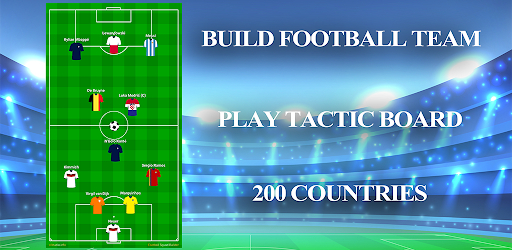
Football Squad Builder on Windows Pc
Developed By: CLStudio Apps
License: Free
Rating: 4,0/5 - 19.306 votes
Last Updated: August 04, 2026
App Details
| Version |
354 |
| Size |
10.7 MB |
| Release Date |
December 11, 25 |
| Category |
Sports Apps |
|
App Permissions:
Allows applications to open network sockets. [see more (6)]
|
|
What's New:
- Best Football Squad Builder- Fix bug [see more]
|
|
Description from Developer:
🧠 Football Squad Builder – Tactical Simulation Engine for Elite Coaches & Analysts
Football Squad Builder is not just a lineup app — it’s a multi-format tactical simulation pla... [read more]
|
About this app
On this page you can download Football Squad Builder and install on Windows PC. Football Squad Builder is free Sports app, developed by CLStudio Apps. Latest version of Football Squad Builder is 354, was released on 2025-12-11 (updated on 2026-08-04). Estimated number of the downloads is more than 5,000,000. Overall rating of Football Squad Builder is 4,0. Generally most of the top apps on Android Store have rating of 4+. This app had been rated by 19,306 users, 12,160 users had rated it 5*, 3,259 users had rated it 1*.
How to install Football Squad Builder on Windows?
Instruction on how to install Football Squad Builder on Windows 10 Windows 11 PC & Laptop
In this post, I am going to show you how to install Football Squad Builder on Windows PC by using Android App Player such as BlueStacks, LDPlayer, Nox, KOPlayer, ...
Before you start, you will need to download the APK/XAPK installer file, you can find download button on top of this page. Save it to easy-to-find location.
[Note] You can also download older versions of this app on bottom of this page.
Below you will find a detailed step-by-step guide, but I want to give you a fast overview of how it works. All you need is an emulator that will emulate an Android device on your Windows PC and then you can install applications and use it - you see you're playing it on Android, but this runs not on a smartphone or tablet, it runs on a PC.
If this doesn't work on your PC, or you cannot install, comment here and we will help you!
Step By Step Guide To Install Football Squad Builder using BlueStacks
- Download and Install BlueStacks at: https://www.bluestacks.com. The installation procedure is quite simple. After successful installation, open the Bluestacks emulator. It may take some time to load the Bluestacks app initially. Once it is opened, you should be able to see the Home screen of Bluestacks.
- Open the APK/XAPK file: Double-click the APK/XAPK file to launch BlueStacks and install the application. If your APK/XAPK file doesn't automatically open BlueStacks, right-click on it and select Open with... Browse to the BlueStacks. You can also drag-and-drop the APK/XAPK file onto the BlueStacks home screen
- Once installed, click "Football Squad Builder" icon on the home screen to start using, it'll work like a charm :D
[Note 1] For better performance and compatibility, choose BlueStacks 5 Nougat 64-bit read more
[Note 2] about Bluetooth: At the moment, support for Bluetooth is not available on BlueStacks. Hence, apps that require control of Bluetooth may not work on BlueStacks.
How to install Football Squad Builder on Windows PC using NoxPlayer
- Download & Install NoxPlayer at: https://www.bignox.com. The installation is easy to carry out.
- Drag the APK/XAPK file to the NoxPlayer interface and drop it to install
- The installation process will take place quickly. After successful installation, you can find "Football Squad Builder" on the home screen of NoxPlayer, just click to open it.
Discussion
(*) is required
🧠 Football Squad Builder – Tactical Simulation Engine for Elite Coaches & Analysts
Football Squad Builder is not just a lineup app — it’s a multi-format tactical simulation platform designed for coaches, analysts, and serious football thinkers. Create advanced playbooks, simulate match phases, plan transitions, and draft elite squads for any competition — from grassroots academies to continental championships.
🧰 Core Tactical Tools
🎯 Tactical Periodization Toolkit
Organize microcycles, define intensity blocks, and link tactical objectives to each training session.
🧠 In-Game Scenario Simulator
Draft multiple match situations: high block press, low block defense, counter transitions, final third overloads.
🔄 Dynamic Transition Phase Planner
Manage shape shifting between offensive and defensive phases: pressing triggers, rest defense, vertical compactness.
🎨 Advanced Tactical Drawing Board
Draw precise runs, third-man actions, inverted fullback roles, false-9 movements, attacking width schemes.
🧩 Multi-Formation Squad Builder
Create and compare formations: 4-2-3-1, 3-4-3, 5-3-2, hybrid systems. Ideal for pre-match preparation or fantasy simulations.
🧬 AI-Enhanced Drafting Engine
Generate optimal starting XIs based on positional roles, stamina simulations, and role-specific criteria (e.g., box-to-box CM, deep-lying playmaker).
📊 Analytics & Visualization Tools
🔍 Opponent Scouting Dashboard
Simulate opponent shape, pressing tendencies, key zones, and match ******** scenarios.
🌡 Heatmap & Positional Zone Designer
Visualize movement flows, player zones, ball progression, and defensive blocks.
📈 xG Scenario Mapping
Draft expected goal positions and simulate expected threat evolution.
🧭 Set-Piece Strategy Builder
Design corner routines, free-kick setups, and offensive restarts using positional markers and decoy runners.
⚙️ Elite Coaching Use-Cases
🏟 Coach Board for UEFA License Holders
Built for licensed coaches: session design, lineup notes, pitch orientation, and vertical/horizontal compactness planner.
🧒 Academy-Level Team Planning
Plan age-specific sessions, small-sided tactics, and training load distribution across development phases.
🔀 Stratagem Simulation for Competitive Edge
Create multi-layered tactical gambits: false pressing, tempo disruption, forced isolation on flanks.
🛠️ Functional Utilities
📐 Stadium & Pitch Customizer
Create custom pitch zones, half-space models, or unique stadium layouts for branding.
🧾 Multi-Format Export
Export tactics as high-resolution PNG, printable PDF, or tactic code sharable with your staff.
📤 Social & Staff Sharing
Share tactics across coaching groups, forums, or community boards.
🌐 Tournament Support
Simulate squads and plans for:
Euro Championship
Copa América
ASEAN Championship
Africa Cup of Nations
Custom Leagues & Fantasy Drafts
💬 Support & Submission
Need help? Facing a bug or want your team’s official uniform featured in the app?
📧 Send all requests to: clstudio.info.applications@gmail.com
🔗 Community
Facebook Coaching Group:
https://www.facebook.com/groups/1503428419765962/
Tactical Tutorials & Guides on YouTube:
https://www.youtube.com/channel/UCPfi4XeYX6MF6wQ84JbBVPA/
Official Website:
https://clstudio.info/
- Best Football Squad Builder
- Fix bug
Allows applications to open network sockets.
Allows applications to access information about networks.
Allows an application to write to external storage.
Allows applications to access information about Wi-Fi networks.
Allows using PowerManager WakeLocks to keep processor from sleeping or screen from dimming.
Allows an application to read from external storage.