Home  /  Photography Apps  / Face Live Camera: Face Filters on Windows Pc

Face Live Camera: Face Filters on Windows Pc

Developed By: Photo & Video Editors - Instant Solution

License: Free

Rating: 4,3/5 - 367.403 votes

Last Updated: August 04, 2026

Download on Windows PC

Compatible with Windows 10/11 PC & Laptop

App Details

Version 2.1.2
Size 43.4 MB
Release Date June 04, 25
Category Photography Apps

App Permissions:
Required to be able to access the camera device. [see more (6)]

Description from Developer:
Face Live Camera: Make Fun Selfies with Creative Filters Get ready to take your selfies to the next level with multifunctional filters that allow you to add effects and make your p... [read more]

App preview ([see all 41 screenshots])
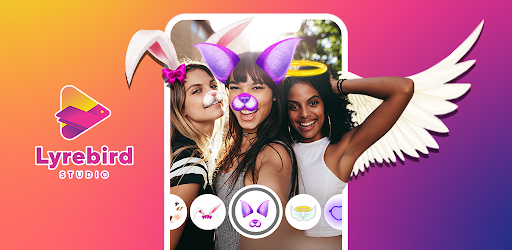
App preview

About this app

On this page you can download Face Live Camera: Face Filters and install on Windows PC. Face Live Camera: Face Filters is free Photography app, developed by Photo & Video Editors - Instant Solution. Latest version of Face Live Camera: Face Filters is 2.1.2, was released on 2025-06-04 (updated on 2026-08-04). Estimated number of the downloads is more than 50,000,000. Overall rating of Face Live Camera: Face Filters is 4,3. Generally most of the top apps on Android Store have rating of 4+. This app had been rated by 367,403 users, 271,693 users had rated it 5*, 36,086 users had rated it 1*.

How to install Face Live Camera: Face Filters on Windows?

Instruction on how to install Face Live Camera: Face Filters on Windows 10 Windows 11 PC & Laptop

In this post, I am going to show you how to install Face Live Camera: Face Filters on Windows PC by using Android App Player such as BlueStacks, LDPlayer, Nox, KOPlayer, ...

Before you start, you will need to download the APK/XAPK installer file, you can find download button on top of this page. Save it to easy-to-find location.

[Note] You can also download older versions of this app on bottom of this page.

Below you will find a detailed step-by-step guide, but I want to give you a fast overview of how it works. All you need is an emulator that will emulate an Android device on your Windows PC and then you can install applications and use it - you see you're playing it on Android, but this runs not on a smartphone or tablet, it runs on a PC.

If this doesn't work on your PC, or you cannot install, comment here and we will help you!

Step By Step Guide To Install Face Live Camera: Face Filters using BlueStacks

  1. Download and Install BlueStacks at: https://www.bluestacks.com. The installation procedure is quite simple. After successful installation, open the Bluestacks emulator. It may take some time to load the Bluestacks app initially. Once it is opened, you should be able to see the Home screen of Bluestacks.
  2. Open the APK/XAPK file: Double-click the APK/XAPK file to launch BlueStacks and install the application. If your APK/XAPK file doesn't automatically open BlueStacks, right-click on it and select Open with... Browse to the BlueStacks. You can also drag-and-drop the APK/XAPK file onto the BlueStacks home screen
  3. Once installed, click "Face Live Camera: Face Filters" icon on the home screen to start using, it'll work like a charm :D

[Note 1] For better performance and compatibility, choose BlueStacks 5 Nougat 64-bit read more

[Note 2] about Bluetooth: At the moment, support for Bluetooth is not available on BlueStacks. Hence, apps that require control of Bluetooth may not work on BlueStacks.

How to install Face Live Camera: Face Filters on Windows PC using NoxPlayer

  1. Download & Install NoxPlayer at: https://www.bignox.com. The installation is easy to carry out.
  2. Drag the APK/XAPK file to the NoxPlayer interface and drop it to install
  3. The installation process will take place quickly. After successful installation, you can find "Face Live Camera: Face Filters" on the home screen of NoxPlayer, just click to open it.

Discussion

(*) is required

Face Live Camera: Make Fun Selfies with Creative Filters Get ready to take your selfies to the next level with multifunctional filters that allow you to add effects and make your photos hilarious! Face Live Camera: Funny Face Filters app unlocks a world of creativity and fun. Whether taking a casual snap or recording a hilarious video, this app makes sure that every picture that you take is vibrant and full of life and charm, perfect for sharing with the world.

Now, you can capture along with your friends and family using Face Camera Filters For Pictures. With every selfie taken, life and laughter is added to the photo.

πŸ“Έ Highlights of Face Live Camera: Funny Face Filters πŸ“Έ
πŸ˜‚ Funny Faces: Photo Filter Apps- designed for hilarious expressions;
😺 Cute animal effects like dog’s ears, rabbit’s nose and many more;
πŸ‘‘ Real-time crowns and angel wings and floral ornaments;
😎 Face Camera Filters For Pictures that beautify and enhance;
🀣 Stickers and live effects with funny filters selfie camera;
🎭 Filters and effects for pictures for all the moods and kinds;
🐢 Creative selfies using funny camera filters and stickers;
🎬 Animated filter fun selfie video recording;
πŸ–ΌοΈ Artistic Face Live Camera: Funny Face Filters;
πŸ“· Capture your fun, save and share with friends.

Unleash your creativity using Face Camera Filters For Pictures!With the help of the Face Camera Filters For Pictures, unleash your artist self. These Picture Filters And Effects are not only aesthetic, but also super fun. If you ever feel like being silly, sweet, or even extremely stylish, you’ll discover something that goes your vibe. The options are endless with wonderful animal effects, sparkling crowns, and animated stickers.

Turn Your Selfies Into Masterpieces:🀳
Funny Faces: Photo Filter Apps gives you the option of putting bunny ears, hearts, sparkles, and whatever else you feel like on, which makes every selfie unique. The Funny Filters Selfie Camera will keep you entertained because you will never take another boring photo again.

Creative Fun Filters:fπŸŽ₯
Experiment with style, humor, and flair using Face Live Camera: Funny Face Filters. Picture Filters And Effects can be added to further match your mood, whether that be romantic, goofy, or fierce!

Best All-In-One Selfie Experience:πŸ“½οΈ
The Funny Filters Selfie Camera has everything you need, from beautifying effects to hilarious stickers, all in one place. You can save the images and revisit them when you need a good laugh. The pictures taken with Funny Camera Filters And Stickers help preserve beautiful memories that can be captured in the most playful ways.

Bring creativity to your photos using Funny Camera Filters and Stickers and express yourself the way you always wanted to. This Funny Faces: Photo Filter Apps promises to exceed the expectations of every user with an endless selection of funny filters and guarantees the most exciting photo experience filled with laughter and giggles.

Begin Taking Photos with Funny Face Filters Apps Now! For all of you selfie lovers out there, Face Live Camera: Funny Face Filters will have you laughing out loud. With Funny Filters Selfie Camera, you can take some of the most creative selfies you'll ever come across! That is, if you use Picture Filters and Effects, you will never run out of creative ways to express yourself. Advanced technology is guaranteed to enhance every photograph you take. Forget about boring pictures, with Face Live Camera: Funny Face Filters, the best and most outrageous selfies are made possible.
Required to be able to access the camera device.
Allows an application to record audio.
Allows applications to access information about networks.
Allows using PowerManager WakeLocks to keep processor from sleeping or screen from dimming.
Allows applications to open network sockets.
Allows applications to access information about Wi-Fi networks.