Currency Converter & Crypto on Windows Pc
Developed By: Alfredo Scarano
License: Free
Rating: 4,7/5 - 14.234 votes
Last Updated: August 05, 2026
App Details
| Version |
4.5.7 |
| Size |
66.5 MB |
| Release Date |
March 07, 24 |
| Category |
Travel & Local Apps |
|
App Permissions:
Allows applications to open network sockets. [see more (6)]
|
|
What's New:
Bug fixes and performance improvements.Got an idea, a request or a bug to report? Tap Send feedback in the side menu — we read every message.Thanks for using... [see more]
|
|
Description from Developer:
The free currency converter and exchange rate calculator trusted by travelers, expats, and crypto investors worldwide. Convert 170+ world currencies and 10,000+ digital assets inst... [read more]
|
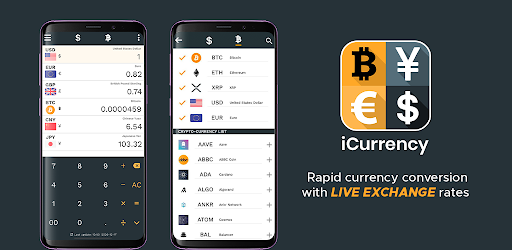
About this app
On this page you can download Currency Converter & Crypto and install on Windows PC. Currency Converter & Crypto is free Travel & Local app, developed by Alfredo Scarano. Latest version of Currency Converter & Crypto is 4.5.7, was released on 2024-03-07 (updated on 2026-08-05). Estimated number of the downloads is more than 100,000. Overall rating of Currency Converter & Crypto is 4,7. Generally most of the top apps on Android Store have rating of 4+. This app had been rated by 14,234 users, 11,802 users had rated it 5*, 418 users had rated it 1*.
How to install Currency Converter & Crypto on Windows?
Instruction on how to install Currency Converter & Crypto on Windows 10 Windows 11 PC & Laptop
In this post, I am going to show you how to install Currency Converter & Crypto on Windows PC by using Android App Player such as BlueStacks, LDPlayer, Nox, KOPlayer, ...
Before you start, you will need to download the APK/XAPK installer file, you can find download button on top of this page. Save it to easy-to-find location.
[Note] You can also download older versions of this app on bottom of this page.
Below you will find a detailed step-by-step guide, but I want to give you a fast overview of how it works. All you need is an emulator that will emulate an Android device on your Windows PC and then you can install applications and use it - you see you're playing it on Android, but this runs not on a smartphone or tablet, it runs on a PC.
If this doesn't work on your PC, or you cannot install, comment here and we will help you!
Step By Step Guide To Install Currency Converter & Crypto using BlueStacks
- Download and Install BlueStacks at: https://www.bluestacks.com. The installation procedure is quite simple. After successful installation, open the Bluestacks emulator. It may take some time to load the Bluestacks app initially. Once it is opened, you should be able to see the Home screen of Bluestacks.
- Open the APK/XAPK file: Double-click the APK/XAPK file to launch BlueStacks and install the application. If your APK/XAPK file doesn't automatically open BlueStacks, right-click on it and select Open with... Browse to the BlueStacks. You can also drag-and-drop the APK/XAPK file onto the BlueStacks home screen
- Once installed, click "Currency Converter & Crypto" icon on the home screen to start using, it'll work like a charm :D
[Note 1] For better performance and compatibility, choose BlueStacks 5 Nougat 64-bit read more
[Note 2] about Bluetooth: At the moment, support for Bluetooth is not available on BlueStacks. Hence, apps that require control of Bluetooth may not work on BlueStacks.
How to install Currency Converter & Crypto on Windows PC using NoxPlayer
- Download & Install NoxPlayer at: https://www.bignox.com. The installation is easy to carry out.
- Drag the APK/XAPK file to the NoxPlayer interface and drop it to install
- The installation process will take place quickly. After successful installation, you can find "Currency Converter & Crypto" on the home screen of NoxPlayer, just click to open it.
Discussion
(*) is required
The free currency converter and exchange rate calculator trusted by travelers, expats, and crypto investors worldwide. Convert 170+ world currencies and 10,000+ digital assets instantly with real-time rates.
Whether you are planning a trip abroad, tracking your crypto portfolio, or comparing prices while shopping online, this lightweight money converter delivers accurate live exchange rates directly on your device.
WHY MILLIONS CHOOSE OUR CURRENCY CONVERTER:
✓ Real-Time Exchange Rates: Fiat and crypto rates update every minute so you never miss a market move.
✓ Powerful Offline Mode: Pre-load rates before you travel — convert prices without internet, anywhere in the world.
✓ 100% Free: All core currency conversion and crypto tracking features are completely free to use.
✓ Dark & Light Themes: Easy on the eyes, day or night.
THE ULTIMATE TRAVEL CURRENCY CALCULATOR
Don’t get caught with bad exchange rates at the airport. Our forex rate calculator lets you:
✓ Pre-load rates for any destination — USD, EUR, GBP, JPY, AUD, INR, AED, BRL, and 160+ more.
✓ Use the rapid calculator to check restaurant bills, taxi fares, or shopping prices on the go.
✓ Pin your favorite currency pairs for instant one-tap comparison.
✓ Drag and drop to reorder currencies — put the ones you need first.
ADVANCED CRYPTO EXCHANGE RATE TRACKER
For the modern investor, we provide deep integration with the digital economy:
✓ Live Bitcoin (BTC) Price Tracking: Monitor BTC, Ethereum (ETH), Solana (SOL), XRP, and 10,000+ tokens.
✓ Stablecoin Rates: Track USDT, USDC, and other pegged assets in real-time.
✓ Crypto Portfolio: Monitor your holdings and see total value in your local fiat currency.
✓ Interactive Charts: Visualize exchange rate trends with customizable timeframes and indicators.
✓ Instant Crypto-to-Fiat Conversion: Convert any coin directly into USD, EUR, GBP, INR, or any local currency.
KEY FEATURES AT A GLANCE:
• Smart Search: Find any fiat money or cryptocurrency in seconds.
• Multi-Currency Display: Track multiple exchange rates on one screen.
• Drag & Drop Reordering: Prioritize your most-used currencies with a long press.
• Interactive Rate Charts: Analyze historical exchange rate data with grid and indicator overlays.
• Offline Currency Converter: Travel-ready — works without Wi-Fi or mobile data.
• Battery Efficient: Lightweight and optimized for all Android devices.
• Optional Ad-Free: Remove ads with an affordable subscription or lifetime purchase.
FREQUENTLY ASKED QUESTIONS:
✓ Is this currency converter free? Yes — all core features are completely free.
✓ Does it work offline? Yes! The app saves the last updated exchange rates for offline conversion.
✓ Can I buy Bitcoin here? No — this is a dedicated currency conversion and rate tracking tool only.
✓ Is there a premium option? Yes — remove ads with a monthly, yearly, or lifetime subscription.
✓ How often do rates update? Every minute for both fiat currencies and crypto assets.
SUPPORT & FEEDBACK
We are constantly working to improve your money converter experience. Questions, suggestions, or feedback?
Contact us: icurrency.feedback@gmail.com
Download Crypto & Currency Converter today — the free exchange rate calculator for travelers, investors, and everyday use.
Bug fixes and performance improvements.
Got an idea, a request or a bug to report? Tap Send feedback in the side menu — we read every message.
Thanks for using iCurrency!
Allows applications to open network sockets.
Allows applications to access information about networks.
Allows applications to access information about Wi-Fi networks.
Allows using PowerManager WakeLocks to keep processor from sleeping or screen from dimming.
Allows access to the vibrator.
Allows an application to receive the ACTION_BOOT_COMPLETED that is broadcast after the system finishes booting.


