Home  /  Education Apps  / Speaking – TOEFL® 2026 Prep on Windows Pc

Speaking – TOEFL® 2026 Prep on Windows Pc

Developed By: Milinix

License: Free

Rating: 4,9/5 - 2.162 votes

Last Updated: August 05, 2026

Download on Windows PC

Compatible with Windows 10/11 PC & Laptop

App Details

Version 3.5
Size 41.3 MB
Release Date January 24, 24
Category Education Apps

App Permissions:
Allows an application to record audio. [see more (7)]

What's New:
🔥 New Update: TOEFL 2026 Format Is Here!The app now supports the new TOEFL format (from 21 Jan 2026) — fully updated tasks and structures to match the latest... [see more]

Description from Developer:
Speaking – TOEFL® New Format 2026

Prepare confidently for the TOEFL iBT® Speaking section (after 21 Jan 2026) with a complete, offline, and exam-focused speaking practice app. Thi... [read more]

App preview ([see all 25 screenshots])
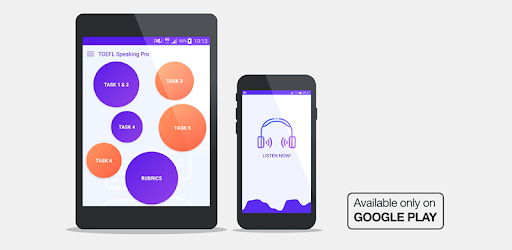
App preview

About this app

On this page you can download Speaking – TOEFL® 2026 Prep and install on Windows PC. Speaking – TOEFL® 2026 Prep is free Education app, developed by Milinix. Latest version of Speaking – TOEFL® 2026 Prep is 3.5, was released on 2024-01-24 (updated on 2026-08-05). Estimated number of the downloads is more than 100,000. Overall rating of Speaking – TOEFL® 2026 Prep is 4,9. Generally most of the top apps on Android Store have rating of 4+. This app had been rated by 2,162 users, 1,939 users had rated it 5*, 11 users had rated it 1*.

How to install Speaking – TOEFL® 2026 Prep on Windows?

Instruction on how to install Speaking – TOEFL® 2026 Prep on Windows 10 Windows 11 PC & Laptop

In this post, I am going to show you how to install Speaking – TOEFL® 2026 Prep on Windows PC by using Android App Player such as BlueStacks, LDPlayer, Nox, KOPlayer, ...

Before you start, you will need to download the APK/XAPK installer file, you can find download button on top of this page. Save it to easy-to-find location.

[Note] You can also download older versions of this app on bottom of this page.

Below you will find a detailed step-by-step guide, but I want to give you a fast overview of how it works. All you need is an emulator that will emulate an Android device on your Windows PC and then you can install applications and use it - you see you're playing it on Android, but this runs not on a smartphone or tablet, it runs on a PC.

If this doesn't work on your PC, or you cannot install, comment here and we will help you!

Step By Step Guide To Install Speaking – TOEFL® 2026 Prep using BlueStacks

  1. Download and Install BlueStacks at: https://www.bluestacks.com. The installation procedure is quite simple. After successful installation, open the Bluestacks emulator. It may take some time to load the Bluestacks app initially. Once it is opened, you should be able to see the Home screen of Bluestacks.
  2. Open the APK/XAPK file: Double-click the APK/XAPK file to launch BlueStacks and install the application. If your APK/XAPK file doesn't automatically open BlueStacks, right-click on it and select Open with... Browse to the BlueStacks. You can also drag-and-drop the APK/XAPK file onto the BlueStacks home screen
  3. Once installed, click "Speaking – TOEFL® 2026 Prep" icon on the home screen to start using, it'll work like a charm :D

[Note 1] For better performance and compatibility, choose BlueStacks 5 Nougat 64-bit read more

[Note 2] about Bluetooth: At the moment, support for Bluetooth is not available on BlueStacks. Hence, apps that require control of Bluetooth may not work on BlueStacks.

How to install Speaking – TOEFL® 2026 Prep on Windows PC using NoxPlayer

  1. Download & Install NoxPlayer at: https://www.bignox.com. The installation is easy to carry out.
  2. Drag the APK/XAPK file to the NoxPlayer interface and drop it to install
  3. The installation process will take place quickly. After successful installation, you can find "Speaking – TOEFL® 2026 Prep" on the home screen of NoxPlayer, just click to open it.

Discussion

(*) is required

Speaking – TOEFL® New Format 2026

Prepare confidently for the TOEFL iBT® Speaking section (after 21 Jan 2026) with a complete, offline, and exam-focused speaking practice app. This app is fully updated to match the new TOEFL® Speaking task types and helps learners of all levels improve fluency, pronunciation, and confidence.

Practise speaking with realistic tasks, record your voice, compare scores, study useful vocabulary, and learn effective strategies — all in one app.

🎤 Fully aligned with TOEFL® Speaking 2026

The new TOEFL® Speaking section includes two task formats. This app supports both:


  • 🔊 Listen & Repeat

  • 🗣️ Take an Interview


🚀 Key Features

🔴 Listen & Repeat Practice

Listen to spoken sentences, repeat them aloud, record your voice, and receive automatic scoring feedback to improve pronunciation, clarity, and accuracy.

🔴 Take an Interview

Practise interview-style speaking tasks similar to the real TOEFL® exam. Record your responses and learn from high-quality sample answers to develop fluent and well-structured replies.

🔴 Speaking Rubrics & Scoring Criteria

Understand how your speaking is evaluated with clear task-specific rubrics covering fluency, pronunciation, coherence, and intelligibility.

🔴 Advanced Score Comparison

A dedicated scoring section helps you interpret your performance:

  • New TOEFL® Speaking score (1–6)

  • Old TOEFL® Speaking score (0–30)

  • CEFR level comparison

  • TOEFL® new score vs IELTS band score

  • Speaking performance descriptors


🔴 Words for Speaking

Learn categorised words and collocations designed specifically for speaking tasks. Each word includes:

  • Meaning

  • Example sentence

  • Pronunciation

  • Progress tracking


🔴 Grammar & Vocabulary Quizzes

Strengthen accuracy and expression with dedicated practice modules:

  • Grammar: multiple-choice quizzes with lessons and clear explanations

  • Vocabulary: meaning, usage, and synonym practice


🔴 Speaking Tips & Strategies

Learn exam-focused tips including:

  • How to respond naturally and clearly

  • Common mistakes to avoid

  • Scoring and examiner expectations

  • Time and response management


🔴 100% Offline & User-Friendly


  • All speaking tasks, scoring, vocabulary, quizzes, and tips work offline

  • No account or sign-up required

  • Lightweight, fast, and optimised for phones and tablets


🎯 Who is this app for?

✔ TOEFL iBT® candidates preparing for the 2026 Speaking format

✔ Beginners to advanced learners

✔ Students aiming for high speaking scores

✔ Learners who want realistic speaking practice with scoring guidance

Download now and practise TOEFL® Speaking with confidence using the latest exam format. 🎧🎙️
We wish you every success in your TOEFL® preparation journey!


Trademark Disclaimer

“TOEFL® is a registered trademark of Educational Testing Service (ETS). This app is not endorsed or approved by ETS.”

📄 Icon Credits

- Some icons are custom-designed or from open-license sources.

- Icons made by Freepik from www.flaticon.com

🔥 New Update: TOEFL 2026 Format Is Here!
The app now supports the new TOEFL format (from 21 Jan 2026) — fully updated tasks and structures to match the latest exam.

Updates:
• New 2026 task formats
• Faster performance
• Minor fixes

Level up your prep and keep improving! 🚀
Allows an application to record audio.
Allows an application to read from external storage.
Allows an application to write to external storage.
Allows applications to open network sockets.
Allows applications to access information about networks.
Allows using PowerManager WakeLocks to keep processor from sleeping or screen from dimming.
Allows an application to receive the ACTION_BOOT_COMPLETED that is broadcast after the system finishes booting.