Sweet Home: Games for kids on Windows Pc
Developed By: SUBARA
License: Free
Rating: 4,6/5 - 106.104 votes
Last Updated: August 04, 2026
App Details
| Version |
1.5.0 |
| Size |
78.5 MB |
| Release Date |
December 12, 25 |
| Category |
Education Apps |
|
App Permissions:
Allows applications to open network sockets. [see more (3)]
|
|
What's New:
We’ve made some small improvements at home!• Everything is running a little smoother behind the scenes • Small updates to keep family life flowing nicely •... [see more]
|
|
Description from Developer:
STORIES JUNIOR GAMES
Gentle pretend play worlds for curious young minds.
Loved by over 300 million families worldwide and awarded for more than a decade, Stories Junior pretend pla... [read more]
|
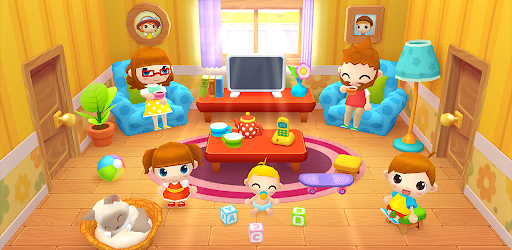
About this app
On this page you can download Sweet Home: Games for kids and install on Windows PC. Sweet Home: Games for kids is free Education app, developed by SUBARA. Latest version of Sweet Home: Games for kids is 1.5.0, was released on 2025-12-12 (updated on 2026-08-04). Estimated number of the downloads is more than 10,000,000. Overall rating of Sweet Home: Games for kids is 4,6. Generally most of the top apps on Android Store have rating of 4+. This app had been rated by 106,104 users, 87,690 users had rated it 5*, 4,647 users had rated it 1*.
How to install Sweet Home: Games for kids on Windows?
Instruction on how to install Sweet Home: Games for kids on Windows 10 Windows 11 PC & Laptop
In this post, I am going to show you how to install Sweet Home: Games for kids on Windows PC by using Android App Player such as BlueStacks, LDPlayer, Nox, KOPlayer, ...
Before you start, you will need to download the APK/XAPK installer file, you can find download button on top of this page. Save it to easy-to-find location.
[Note] You can also download older versions of this app on bottom of this page.
Below you will find a detailed step-by-step guide, but I want to give you a fast overview of how it works. All you need is an emulator that will emulate an Android device on your Windows PC and then you can install applications and use it - you see you're playing it on Android, but this runs not on a smartphone or tablet, it runs on a PC.
If this doesn't work on your PC, or you cannot install, comment here and we will help you!
Step By Step Guide To Install Sweet Home: Games for kids using BlueStacks
- Download and Install BlueStacks at: https://www.bluestacks.com. The installation procedure is quite simple. After successful installation, open the Bluestacks emulator. It may take some time to load the Bluestacks app initially. Once it is opened, you should be able to see the Home screen of Bluestacks.
- Open the APK/XAPK file: Double-click the APK/XAPK file to launch BlueStacks and install the application. If your APK/XAPK file doesn't automatically open BlueStacks, right-click on it and select Open with... Browse to the BlueStacks. You can also drag-and-drop the APK/XAPK file onto the BlueStacks home screen
- Once installed, click "Sweet Home: Games for kids" icon on the home screen to start using, it'll work like a charm :D
[Note 1] For better performance and compatibility, choose BlueStacks 5 Nougat 64-bit read more
[Note 2] about Bluetooth: At the moment, support for Bluetooth is not available on BlueStacks. Hence, apps that require control of Bluetooth may not work on BlueStacks.
How to install Sweet Home: Games for kids on Windows PC using NoxPlayer
- Download & Install NoxPlayer at: https://www.bignox.com. The installation is easy to carry out.
- Drag the APK/XAPK file to the NoxPlayer interface and drop it to install
- The installation process will take place quickly. After successful installation, you can find "Sweet Home: Games for kids" on the home screen of NoxPlayer, just click to open it.
Discussion
(*) is required
STORIES JUNIOR GAMES
Gentle pretend play worlds for curious young minds.
Loved by over 300 million families worldwide and awarded for more than a decade, Stories Junior pretend play games invites children to imagine, create, and explore gentle family worlds filled with creativity and care to build their own stories.
Each playhouse is designed for open-ended discovery, where children lead the story, express emotions, and build empathy through imaginative role play.
Every space encourages curiosity, storytelling, and calm exploration in a safe digital environment made for kids in their early childhood.
STORIES JUNIOR: SWEET HOME
A warm family dollhouse full of stories to create.
Stories Junior: Sweet Home (previously Sweet Home Stories) invites kids to join a loving virtual family and discover everyday moments that inspire imagination and care in a cozy playhouse.
Children can take care of other kids, a baby, or a dog; help around the house with different tasks, prepare meals, or simply enjoy quiet family time in each room.
Every routine becomes a new story to tell — a gentle pretend play experience about family, love, empathy, and daily life that fosters imagination and storytelling skills.
Each room in this playhouse feels warm and full of life — with soft sounds, cozy lighting, and small surprises waiting to be discovered, each turning into a new story waiting to be told: setting the table becomes teamwork, bath time turns into laughter, and bedtime is a quiet ritual full of love.
Switch between day and night to unlock pretend play possibilities. As the day turns into night, the home changes too — toys rest, lights dim, and the family gathers to read, relax, and dream together.
From morning routines to bedtime stories, every moment in this household feels alive. Kids can prepare breakfast together, take care of the baby, feed the dog, and share calm moments that grow into family memories.
DISCOVER THE PLAYHOUSE
Front Yard – Play outdoors, await visitors, or check the mailbox for surprises.
Living Room – Enjoy quality moments with the whole family.
Kitchen – Cook together and set the table for everyone.
Kids’ Bedroom – Clean up the toys and dolls scattered around. Rest, read, or prepare for the next day.
Parents’ Bedroom – Put the baby to sleep and rest after a long day.
Bathroom – Bathe family members or do the laundry.
Garden – Grow plants or play music with the kids under the sun.
A FAMILY FULL OF HEART
Six unique characters, including a cat, invite kids to create family stories and pretend-play everyday situations.
Feed, bathe, dress, and care for each family member — every action helps nurture imagination, empathy, and understanding of real-life routines.
CREATED FOR PEACEFUL PLAY
• Designed for children ages 2–6 to explore safely and independently.
• Detailed enough to entertain older family members too.
• Private, single-player experience with no chats or online features.
• Works perfectly offline once installed.
EXPAND YOUR HOME STORIES
Stories Junior: Sweet Home is free to download and includes a complete household playhouse with many rooms and activities to explore.
Families can expand the home at any time with a single, safe purchase — make the house even better with new stories to discover.
WHY FAMILIES LOVE STORIES JUNIOR
Families around the world trust Stories Junior for calm, creative pretend play that supports imagination and emotional growth.
Each title offers a gentle toy-box world where children explore family life, storytelling, and empathy at their own pace.
Stories Junior — Calm, creative play for growing minds.
We’ve made some small improvements at home!
• Everything is running a little smoother behind the scenes
• Small updates to keep family life flowing nicely
• Ready for more stories, playtime, and cozy fun
Thanks for playing Sweet Home Stories!
Allows applications to open network sockets.
Allows applications to access information about networks.
Allows using PowerManager WakeLocks to keep processor from sleeping or screen from dimming.


