BloodPressure DB – BP Tracker on Windows Pc
Developed By: klier.net International S.L.
License: Free
Rating: 3,7/5 - 6.263 votes
Last Updated: August 04, 2026
App Details
| Version |
8.3.0 |
| Size |
13.1 MB |
| Release Date |
December 20, 25 |
| Category |
Medical Apps |
|
App Permissions:
Allows applications to open network sockets. [see more (8)]
|
|
What's New:
The new version makes your charts interactive. You can now easily move the time range with your fingers as well as zoom in and out. In addition, there is now a... [see more]
|
|
Description from Developer:
Track, monitor, and manage your blood pressure effortlessly with our comprehensive blood pressure monitor tracker app. Designed for users seeking an easy and accurate way to check... [read more]
|
About this app
On this page you can download BloodPressure DB – BP Tracker and install on Windows PC. BloodPressure DB – BP Tracker is free Medical app, developed by klier.net International S.L.. Latest version of BloodPressure DB – BP Tracker is 8.3.0, was released on 2025-12-20 (updated on 2026-08-04). Estimated number of the downloads is more than 1,000,000. Overall rating of BloodPressure DB – BP Tracker is 3,7. Generally most of the top apps on Android Store have rating of 4+. This app had been rated by 6,263 users, 3,387 users had rated it 5*, 1,374 users had rated it 1*.
How to install BloodPressure DB – BP Tracker on Windows?
Instruction on how to install BloodPressure DB – BP Tracker on Windows 10 Windows 11 PC & Laptop
In this post, I am going to show you how to install BloodPressure DB – BP Tracker on Windows PC by using Android App Player such as BlueStacks, LDPlayer, Nox, KOPlayer, ...
Before you start, you will need to download the APK/XAPK installer file, you can find download button on top of this page. Save it to easy-to-find location.
[Note] You can also download older versions of this app on bottom of this page.
Below you will find a detailed step-by-step guide, but I want to give you a fast overview of how it works. All you need is an emulator that will emulate an Android device on your Windows PC and then you can install applications and use it - you see you're playing it on Android, but this runs not on a smartphone or tablet, it runs on a PC.
If this doesn't work on your PC, or you cannot install, comment here and we will help you!
Step By Step Guide To Install BloodPressure DB – BP Tracker using BlueStacks
- Download and Install BlueStacks at: https://www.bluestacks.com. The installation procedure is quite simple. After successful installation, open the Bluestacks emulator. It may take some time to load the Bluestacks app initially. Once it is opened, you should be able to see the Home screen of Bluestacks.
- Open the APK/XAPK file: Double-click the APK/XAPK file to launch BlueStacks and install the application. If your APK/XAPK file doesn't automatically open BlueStacks, right-click on it and select Open with... Browse to the BlueStacks. You can also drag-and-drop the APK/XAPK file onto the BlueStacks home screen
- Once installed, click "BloodPressure DB – BP Tracker" icon on the home screen to start using, it'll work like a charm :D
[Note 1] For better performance and compatibility, choose BlueStacks 5 Nougat 64-bit read more
[Note 2] about Bluetooth: At the moment, support for Bluetooth is not available on BlueStacks. Hence, apps that require control of Bluetooth may not work on BlueStacks.
How to install BloodPressure DB – BP Tracker on Windows PC using NoxPlayer
- Download & Install NoxPlayer at: https://www.bignox.com. The installation is easy to carry out.
- Drag the APK/XAPK file to the NoxPlayer interface and drop it to install
- The installation process will take place quickly. After successful installation, you can find "BloodPressure DB – BP Tracker" on the home screen of NoxPlayer, just click to open it.
Discussion
(*) is required
Track, monitor, and manage your blood pressure effortlessly with our comprehensive blood pressure monitor tracker app. Designed for users seeking an easy and accurate way to check and track their blood pressure, this app offers everything you need to stay on top of your heart health. With seamless integration and user-friendly features, it's never been easier to perform a blood pressure check anytime, anywhere.
Key Features:
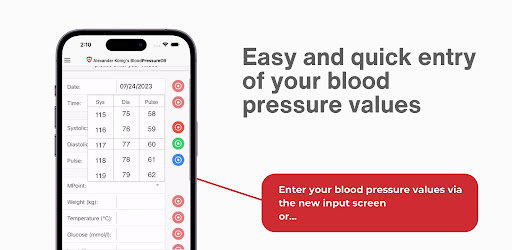
- Blood pressure monitor tracker: Keep a detailed log of your blood pressure readings and monitor trends over time.
- Blood pressure check: Perform quick and reliable checks with easy-to-use tools.
- Check blood pressure reminders: Never forget to check your blood pressure with customizable reminders.
- Comprehensive blood pressure diary: Record daily readings and keep track of your blood pressure history.
- Blood pressure tracker app: Monitor changes and receive insights to maintain optimal blood pressure levels.
- Integrated Oxygen (Spo2) tracking for comprehensive health monitoring.
- Easy connection with bluetooth devices for hassle-free data syncing.
- Advanced metrics including heart rate, oxygen levels, and glucose tracking.
- Compatible with popular devices like withings blood pressure, withings health mate, and omron connect for seamless data synchronization.
- Easily manage your measurements with withings blood pressure monitors and omron blood pressure devices.
- User-friendly interface and detailed reports for better blood pressure management.
Whether you are using the blood pressure app free version or premium, our app ensures you can measure blood pressure accurately and effectively. With the bp monitor and bp tracker functionalities, you get precise tracking and actionable insights to maintain a healthy lifestyle.
Why Choose Our App?
- Stay consistent with your blood pressure monitor routine and receive helpful reminders.
- Easily check blood pressure without complicated procedures.
- Get notified to perform your regular blood pressure check for better heart health.
- Sync seamlessly with devices through bluetooth and access data from withings blood pressure, withings health mate, and omron blood pressure monitors.
- Analyze your blood pressure diary for trends, patterns, and health improvements.
- Integrated heart rate, oxygen, and glucose tracking for a holistic view of your health.
Our app is perfect for anyone who wants to check blood pressure, maintain a blood pressure diary, or use a reliable blood pressure tracker app. With features like the blood pressure monitor tracker, Spo2 measurement, and heart rate monitoring, you have all the tools you need in one app. Easily sync data with withings blood pressure monitors, as seen in withings health mate. Monitor your vitals using devices like omron connect and omron blood pressure monitors.
Additional Benefits:
- Access to the blood pressure app free version with essential features.
- Advanced options to measure blood pressure on a long-term basis.
- Support for free blood pressure monitor devices.
- Detailed analysis of your bp monitor data to help you manage your health effectively.
- Easy sharing of blood pressure reports with healthcare professionals via PDF.
Stay on top of your health with our all-in-one solution for blood pressure, heart rate, and Spo2 tracking.
Download the blood pressure monitor tracker now and take control of your wellness journey today!
The new version makes your charts interactive. You can now easily move the time range with your fingers as well as zoom in and out. In addition, there is now a search function in the info section, improved chart quality in the PDF, and a new display of the average for multiple measurements directly after entry. Bug fixes and minor improvements round off this update. Thank you for your support and your valuable feedback!
Allows applications to open network sockets.
Allows an application to read from external storage.
Allows an application to receive the ACTION_BOOT_COMPLETED that is broadcast after the system finishes booting.
Allows using PowerManager WakeLocks to keep processor from sleeping or screen from dimming.
Allows an application to record audio.
Allows an application to modify global audio settings.
Allows applications to access information about networks.
Allows an application to write to external storage.


