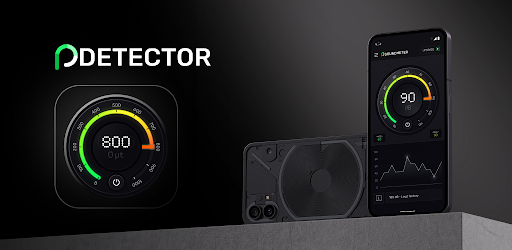
Perfect Metal Detector on Windows Pc
Developed By: Cards
License: Free
Rating: 3,8/5 - 5.373 votes
Last Updated: August 04, 2026
App Details
| Version |
4.0.13 |
| Size |
19.3 MB |
| Release Date |
December 12, 25 |
| Category |
Tools Apps |
|
App Permissions:
Allows applications to open network sockets. [see more (5)]
|
|
What's New:
Overall improvement in application performance. [see more]
|
|
Description from Developer:
Metal Detector is an application which detects the presence of metal nearby by measuring the magnetic field value. This useful tool uses the magnetic sensor built-in your mobile de... [read more]
|
About this app
On this page you can download Perfect Metal Detector and install on Windows PC. Perfect Metal Detector is free Tools app, developed by Cards. Latest version of Perfect Metal Detector is 4.0.13, was released on 2025-12-12 (updated on 2026-08-04). Estimated number of the downloads is more than 1,000,000. Overall rating of Perfect Metal Detector is 3,8. Generally most of the top apps on Android Store have rating of 4+. This app had been rated by 5,373 users, 3,103 users had rated it 5*, 1,228 users had rated it 1*.
How to install Perfect Metal Detector on Windows?
Instruction on how to install Perfect Metal Detector on Windows 10 Windows 11 PC & Laptop
In this post, I am going to show you how to install Perfect Metal Detector on Windows PC by using Android App Player such as BlueStacks, LDPlayer, Nox, KOPlayer, ...
Before you start, you will need to download the APK/XAPK installer file, you can find download button on top of this page. Save it to easy-to-find location.
[Note] You can also download older versions of this app on bottom of this page.
Below you will find a detailed step-by-step guide, but I want to give you a fast overview of how it works. All you need is an emulator that will emulate an Android device on your Windows PC and then you can install applications and use it - you see you're playing it on Android, but this runs not on a smartphone or tablet, it runs on a PC.
If this doesn't work on your PC, or you cannot install, comment here and we will help you!
Step By Step Guide To Install Perfect Metal Detector using BlueStacks
- Download and Install BlueStacks at: https://www.bluestacks.com. The installation procedure is quite simple. After successful installation, open the Bluestacks emulator. It may take some time to load the Bluestacks app initially. Once it is opened, you should be able to see the Home screen of Bluestacks.
- Open the APK/XAPK file: Double-click the APK/XAPK file to launch BlueStacks and install the application. If your APK/XAPK file doesn't automatically open BlueStacks, right-click on it and select Open with... Browse to the BlueStacks. You can also drag-and-drop the APK/XAPK file onto the BlueStacks home screen
- Once installed, click "Perfect Metal Detector" icon on the home screen to start using, it'll work like a charm :D
[Note 1] For better performance and compatibility, choose BlueStacks 5 Nougat 64-bit read more
[Note 2] about Bluetooth: At the moment, support for Bluetooth is not available on BlueStacks. Hence, apps that require control of Bluetooth may not work on BlueStacks.
How to install Perfect Metal Detector on Windows PC using NoxPlayer
- Download & Install NoxPlayer at: https://www.bignox.com. The installation is easy to carry out.
- Drag the APK/XAPK file to the NoxPlayer interface and drop it to install
- The installation process will take place quickly. After successful installation, you can find "Perfect Metal Detector" on the home screen of NoxPlayer, just click to open it.
Discussion
(*) is required
Metal Detector is an application which detects the presence of metal nearby by measuring the magnetic field value. This useful tool uses the magnetic sensor built-in your mobile device and shows magnetic field level in μT (microtesla). The magnetic field level (EMF) in nature is about 49μT(micro tesla) or 490mG(milli gauss); 1μT = 10mG. If any metal is near, the value of magnetic field will increase.
Metal Detector allows to identify any metal object in area, because all metals generate magnetic field which strength can be measured with this tool.
Usage is quite simple: launch this application on your mobile device and move it around. You will see that the magnetic field level shown on screen is constantly fluctuating. Colorful lines represent the three dimensions and the numbers on top shows the value of magnetic field level (EMF). The chart will increase and the device will vibrate and makes sounds announcing that metal is close. In settings you can change the sensitivity of vibration and sound effects.
You might use the Metal Detector it to find electrical wires in walls (like a stud finder), iron pipes on the ground... or pretend it's a ghost detector and scare someone! The accuracy of tool depends entirely on the sensor in your mobile device. Please, note that due to electromagnetic waves, the magnetic sensor is affected by electronic equipment.
Turn your phone into a real metal detector with Metal Detector – the most powerful metal detecting tool for Android. Whether you're a treasure hunter, a DIY enthusiast, or just curious, this easy to use metal detector helps you detect metal objects, find hidden metal, and even measure electromagnetic field intensity with precision.
Utilizing your device’s magnetic sensor, Metal Detector acts as a magnetic field detector and magnetic sensor tool to detect electromagnetic field waves around you. It’s your go-to professional metal finder and mobile metal scanner for both fun and practical use.
Features:
- Customization – choose your favourite colour
- Sensor sensitivity adjustment
- Graph refresh rate
- Alarm sound
- Vibration alert
- Calibration tool
- Alarm trigger value
- Accurate EMF detector and EMF measurement
- Magnetic field measurement for scientific use
- Locate and find pipes and wires in walls
- Real-time metal detection tool with sound and visual indicators
- Discover buried items like a treasure finder
- Use it as a pipe and wire detector or iron detector
- Works as a wall scanner and construction scanner
- Ideal home improvement tool
Whether you're trying to find metal pipes in wall, locate hidden wires and pipes, or just want a professional metal detection solution, Metal Detector delivers.
- Use this handheld metal detector and portable metal scanner to easily detect metal, find metal, or perform iron detection in any environment.
- Includes calibration tool for improved accuracy.
- Start scanning now and scan for hidden objects with a smart metal finder that’s both powerful and reliable.
- Learn how to detect metal with phone and explore hidden treasures around you!
Metal Detector transforms your smartphone into a reliable metal detecting app, perfect for both hobbyists and professionals. This advanced magnetic field detector uses cutting-edge technology to find metal and precisely detect metal in various environments. With its integrated magnetic sensor, it becomes a powerful iron detector and pipe and wire detector, ideal for discovering hidden infrastructure.
Download Metal Detector – your ultimate real metal finder and professional metal finder today!
Metal detector cannot detect gold, silver and coins made by copper. They are classified as non-ferrous that has no magnetic field.
Try this useful tool!
Attention! Not every model of smartphone has a magnetic field sensor. If your device does not have one, the application will not work. Sorry for this inconvenience. Contact us (mobile@netigen.pl), and we will try to help.
Overall improvement in application performance.
Allows applications to open network sockets.
Allows an app to access approximate location.
Allows access to the vibrator.
Allows applications to access information about networks.
Allows using PowerManager WakeLocks to keep processor from sleeping or screen from dimming.