Cave FRVR - Spaceship Landing on Windows Pc
Developed By: FRVR
License: Free
Rating: 4,1/5 - 647 votes
Last Updated: August 05, 2026
Game Details
| Version |
1.8.12 |
| Size |
20.5 MB |
| Release Date |
November 14, 24 |
| Category |
Action Games |
|
Game Permissions:
Allows applications to open network sockets. [see more (3)]
|
|
What's New:
Thank you for playing an FRVR game. At FRVR we want you to have the best experience possible with our games.That is why we routinely update the game to bring... [see more]
|
|
Description from Developer:
Enter the cave and explore the depths of an alien planet where your piloting skills will be the only thing that can save you! Start the engines of your spaceship, let the turbines... [read more]
|
About this game
On this page you can download Cave FRVR - Spaceship Landing and play on Windows PC. Cave FRVR - Spaceship Landing is free Action game, developed by FRVR. Latest version of Cave FRVR - Spaceship Landing is 1.8.12, was released on 2024-11-14 (updated on 2026-08-05). Estimated number of the downloads is more than 50,000. Overall rating of Cave FRVR - Spaceship Landing is 4,1. Generally most of the top apps on Android Store have rating of 4+. This game had been rated by 647 users, 388 users had rated it 5*, 59 users had rated it 1*.
How to play Cave FRVR - Spaceship Landing on Windows?
Instruction on how to play Cave FRVR - Spaceship Landing on Windows 10 Windows 11 PC & Laptop
In this post, I am going to show you how to install Cave FRVR - Spaceship Landing on Windows PC by using Android App Player such as BlueStacks, LDPlayer, Nox, KOPlayer, ...
Before you start, you will need to download the APK/XAPK installer file, you can find download button on top of this page. Save it to easy-to-find location.
[Note] You can also download older versions of this game on bottom of this page.
Below you will find a detailed step-by-step guide, but I want to give you a fast overview of how it works. All you need is an emulator that will emulate an Android device on your Windows PC and then you can install applications and use it - you see you're playing it on Android, but this runs not on a smartphone or tablet, it runs on a PC.
If this doesn't work on your PC, or you cannot install, comment here and we will help you!
Step By Step Guide To Play Cave FRVR - Spaceship Landing using BlueStacks
- Download and Install BlueStacks at: https://www.bluestacks.com. The installation procedure is quite simple. After successful installation, open the Bluestacks emulator. It may take some time to load the Bluestacks app initially. Once it is opened, you should be able to see the Home screen of Bluestacks.
- Open the APK/XAPK file: Double-click the APK/XAPK file to launch BlueStacks and install the application. If your APK/XAPK file doesn't automatically open BlueStacks, right-click on it and select Open with... Browse to the BlueStacks. You can also drag-and-drop the APK/XAPK file onto the BlueStacks home screen
- Once installed, click "Cave FRVR - Spaceship Landing" icon on the home screen to start playing, it'll work like a charm :D
[Note 1] For better performance and compatibility, choose BlueStacks 5 Nougat 64-bit read more
[Note 2] about Bluetooth: At the moment, support for Bluetooth is not available on BlueStacks. Hence, apps that require control of Bluetooth may not work on BlueStacks.
How to play Cave FRVR - Spaceship Landing on Windows PC using NoxPlayer
- Download & Install NoxPlayer at: https://www.bignox.com. The installation is easy to carry out.
- Drag the APK/XAPK file to the NoxPlayer interface and drop it to install
- The installation process will take place quickly. After successful installation, you can find "Cave FRVR - Spaceship Landing" on the home screen of NoxPlayer, just click to open it.
Discussion
(*) is required
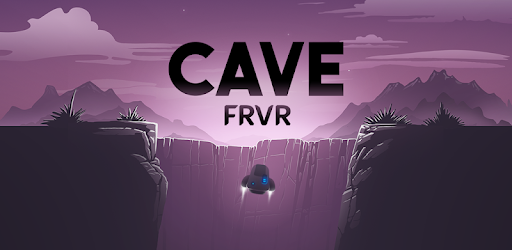
Enter the cave and explore the depths of an alien planet where your piloting skills will be the only thing that can save you! Start the engines of your spaceship, let the turbines spin, jump over platforms and smoothly land the moon lander on a refueling base. How far can you get in this space landing game?
Are you ready to hone your piloting skills and navigate your way through an endlessly deep cave?
🚀🚀🚀🚀🚀🚀🚀🚀🚀
Piloting a futuristic spaceship looks difficult but in Cave FRVR you will fly through the cave and drive the moon lander like a real astronaut with just one finger! An easy to learn physics based controls: tap the screen to control the engines of the spacecraft and steer the thrust to wisely avoid all the obstacles inside the cave.
Cave FRVR is a truly retro arcade experience, designed for both players looking for a fun time driving a futuristic spacecraft and hardplayers looking for a real exploration challenge. Simple and incredibly addictive gameplay, easy to play but hard to master. Complete the daily missions and mini-quests to get extra rewards. Dare yourself to get into the bonus stages, only the bravest pilots pass the challenge!
Level up your spacecraft by collecting gems on your way to depths. Equip powerful and useful items like lasers, energy shields or gem attraction gadget. Pick up safety shields along the way to help guard your spaceship against crashing into the rugged walls and destroying your craft. Safety shields are also useful protection from any underground attackers you may happen across as you navigate the numerous twists and turns.
Pilot your spaceship through a cave filled with stalactites, asteroids, bombs and refueling platforms. Collect jewels and watch your score increase as you travel into the depths and discover the secrets of Cave FRVR. Don’t worry, there are platforms along the way where you can fuel up and collect points, but you’ll need dexterity and quick reflexes – wait for your landing gear to appear before lowering your craft! Survive as much as you can in an unearthly world as you explore exotic caverns.
Shoot the lasers to destroy the rocks, hit the rocket thrust of your spacecraft and avoid the asteroids that are chasing you. Upgrade your spaceship with new gear that you’ll find deep in the cave, equip them in the space station. Every part of your spacecraft is upgradeable, from getting a gem attraction boost, to install an overpowered new engine, so collect new gears during your exploration in all the hidden supply boxes and make your spaceship the fastest spacecraft in the galaxy.
Cave FRVR is a low storage game, you don’t need more than 30 mb to play! This free moon lander game only focuses on giving you a truly fun experience in a low mb game for free. It’s an easy to play space exploration game with incredibly addictive and simple controls, so both young and adults can have fun. Play online or offline, since you don’t need an internet connection to play this landing game. And relax, you can play as much as you want, there’s no time limit!
Do you like it? We have a lot of free games for you!
https://frvr.com
https://cave.frvr.com
https://fb.me/frvrgames
https://fb.me/cave.frvr.instant
Thank you for playing an FRVR game. At FRVR we want you to have the best experience possible with our games.
That is why we routinely update the game to bring you bugfixes, new features and improvements to gameplay.
Allows applications to open network sockets.
Allows applications to access information about networks.
Allows using PowerManager WakeLocks to keep processor from sleeping or screen from dimming.


