Sesh: Workouts for Women on Windows Pc
Developed By: Undefined AI
License: Free
Rating: 4,8/5 - 653 votes
Last Updated: August 05, 2026
App Details
| Version |
4.5.2 |
| Size |
72.8 MB |
| Release Date |
September 18, 25 |
| Category |
Health & Fitness Apps |
|
App Permissions:
Allows applications to open network sockets. [see more (8)]
|
|
What's New:
Just a little tune-up to keep things moving. No better time to hit the gym and crush those goals! [see more]
|
|
Description from Developer:
Start with our FREE full-body fitness plan, yours to keep forever just for downloading the app! Get in the best shape of your life alongside 400,000+ women who have already transfo... [read more]
|
About this app
On this page you can download Sesh: Workouts for Women and install on Windows PC. Sesh: Workouts for Women is free Health & Fitness app, developed by Undefined AI. Latest version of Sesh: Workouts for Women is 4.5.2, was released on 2025-09-18 (updated on 2026-08-05). Estimated number of the downloads is more than 50,000. Overall rating of Sesh: Workouts for Women is 4,8. Generally most of the top apps on Android Store have rating of 4+. This app had been rated by 653 users, 587 users had rated it 5*, 12 users had rated it 1*.
How to install Sesh: Workouts for Women on Windows?
Instruction on how to install Sesh: Workouts for Women on Windows 10 Windows 11 PC & Laptop
In this post, I am going to show you how to install Sesh: Workouts for Women on Windows PC by using Android App Player such as BlueStacks, LDPlayer, Nox, KOPlayer, ...
Before you start, you will need to download the APK/XAPK installer file, you can find download button on top of this page. Save it to easy-to-find location.
[Note] You can also download older versions of this app on bottom of this page.
Below you will find a detailed step-by-step guide, but I want to give you a fast overview of how it works. All you need is an emulator that will emulate an Android device on your Windows PC and then you can install applications and use it - you see you're playing it on Android, but this runs not on a smartphone or tablet, it runs on a PC.
If this doesn't work on your PC, or you cannot install, comment here and we will help you!
Step By Step Guide To Install Sesh: Workouts for Women using BlueStacks
- Download and Install BlueStacks at: https://www.bluestacks.com. The installation procedure is quite simple. After successful installation, open the Bluestacks emulator. It may take some time to load the Bluestacks app initially. Once it is opened, you should be able to see the Home screen of Bluestacks.
- Open the APK/XAPK file: Double-click the APK/XAPK file to launch BlueStacks and install the application. If your APK/XAPK file doesn't automatically open BlueStacks, right-click on it and select Open with... Browse to the BlueStacks. You can also drag-and-drop the APK/XAPK file onto the BlueStacks home screen
- Once installed, click "Sesh: Workouts for Women" icon on the home screen to start using, it'll work like a charm :D
[Note 1] For better performance and compatibility, choose BlueStacks 5 Nougat 64-bit read more
[Note 2] about Bluetooth: At the moment, support for Bluetooth is not available on BlueStacks. Hence, apps that require control of Bluetooth may not work on BlueStacks.
How to install Sesh: Workouts for Women on Windows PC using NoxPlayer
- Download & Install NoxPlayer at: https://www.bignox.com. The installation is easy to carry out.
- Drag the APK/XAPK file to the NoxPlayer interface and drop it to install
- The installation process will take place quickly. After successful installation, you can find "Sesh: Workouts for Women" on the home screen of NoxPlayer, just click to open it.
Discussion
(*) is required
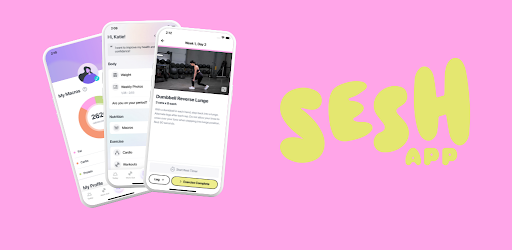
Start with our FREE full-body fitness plan, yours to keep forever just for downloading the app! Get in the best shape of your life alongside 400,000+ women who have already transformed their body, mind, & life with Sesh! With 70+ fitness plans, thousands of workout videos, free nutrition calculator, delicious recipes, progress tracking, & support from our community, your path to fitness just got easier!
Sesh Fitness App is FREE to download & offers multiple subscription options: Basic, Premium & Sesh+ Coaching. We offer a 20% discount with quarterly & a 40% discount with annual subscriptions.
GENERATE NEW WORKOUTS ON DEMAND
Create new, effective workouts in just a few taps with our proprietary Workout Generator! Choose your equipment, setting, target area, & duration to generate infinite, custom strength-training sessions every day, complete with reps & sets that align with your goal. With easy-to-follow videos & instructions for each movement, you’ll nail every exercise, so you can worry less about form & more about your progress.
FITNESS PLANS THAT FIT YOUR GOALS & LIFESTYLE
Whatever your fitness level or body type, Sesh Fitness is here for you. Our programs are customized to fit where you are now & take you where you want to go, all backed by science & designed by certified female trainers. We have tons of proven plans: to grow your booty, postpartum for new moms, dumbbell-only & home exercises, 30-minute workouts, & programs for your core, enhance your mobility, & more. No matter what your goal is, Sesh Fitness can help you get and stay there.
GET IN THE BEST SHAPE OF YOUR LIFE BY WORKING WITH A SESH+ COACH
Fast-track your results by working 1:1 with a real-life, certified fitness & nutrition trainer through our Coaching subscription: Sesh+. Experience real-time feedback, unlimited messaging, & a journey tailored to your goals, schedule, & lifestyle. If you’ve felt overwhelmed by the path to fitness or struggle to make progress, our Sesh+ Subscription will radically change the way you approach fitness & nutrition.
PERSONALIZED NUTRITION & MACRO-FRIENDLY RECIPES
Ditch the cookie-cutter, low-calorie diets & discover the optimal nutritional needs for YOUR body, goals, & lifestyle, that adjusts with your progress! FREE to everyone, our Macro Calculator will help you experience better results, faster body recomposition, less hunger, & more food freedom! Every program in our app also includes a Nutrition Guide, packed with food education, guidance, & macro-friendly recipes!
EVERYTHING IN THE PALM OF YOUR HAND
Working out with Sesh Fitness is just... better! Our fully-loaded app experience is packed with features to make your workouts easier. Make faster progress with our weight & rep tracking, optimize your workouts with our rest timer, stay accountable & motivated with our progress check-ins & more!
BUILT BY WOMEN, FOR WOMEN
It’s in our DNA to empower women to become the best versions of themselves. We’ll help you retrain your brain on things like 1,200-calorie diets & weightlifting. We have the perfect plan to get you where you want to go… no matter your starting point, fitness level, or clothing size. The Sesh team knows what it’s like trying to juggle careers, kids, social lives & health because we’re women just like you! Whether it’s your Sesh+ Coach or our community, you’re never alone at Sesh Fitness.
Subscription Pricing & Terms:
Free to download. Ongoing use requires a monthly membership. You’ll be charged through your Play Store Account at confirmation of purchase. Subscriptions renew automatically unless canceled 24 hours prior to the end of the subscription period. Subscriptions can be managed by going to Account Settings. Refunds are not available once a purchase has been made. Read our full Terms of Service https://seshfitnessapp.com/terms-of-service & our Privacy Policy https://seshfitnessapp.com/privacy-policy.
Just a little tune-up to keep things moving. No better time to hit the gym and crush those goals!
Allows applications to open network sockets.
Allows applications to access information about networks.
Required to be able to access the camera device.
Allows an application to record audio.
Allows access to the vibrator.
Allows using PowerManager WakeLocks to keep processor from sleeping or screen from dimming.
Allows an application to receive the ACTION_BOOT_COMPLETED that is broadcast after the system finishes booting.
Allows applications to change network connectivity state.


