Spirit Run: PvP Temple Clash on Windows Pc
Developed By: RetroStyle Games UA
License: Free
Rating: 4,3/5 - 3.950 votes
Last Updated: August 04, 2026
Game Details
| Version |
1.053 |
| Size |
64 MB |
| Release Date |
December 12, 25 |
| Category |
Role Playing Games |
|
Game Permissions:
Allows applications to open network sockets. [see more (4)]
|
|
What's New:
New Update available!We have cleaned up a few things behind the scenes to improve your experience.Bug fixes and improvements.Keep running! [see more]
|
|
Description from Developer:
Join the online multiplayer battle arena in the universe of the Spirit Run: Multiplayer, an online endless runner! Enjoy high-speed action with intense real-time running multiplaye... [read more]
|
About this game
On this page you can download Spirit Run: PvP Temple Clash and play on Windows PC. Spirit Run: PvP Temple Clash is free Role Playing game, developed by RetroStyle Games UA. Latest version of Spirit Run: PvP Temple Clash is 1.053, was released on 2025-12-12 (updated on 2026-08-04). Estimated number of the downloads is more than 100,000. Overall rating of Spirit Run: PvP Temple Clash is 4,3. Generally most of the top apps on Android Store have rating of 4+. This game had been rated by 3,950 users, 2,679 users had rated it 5*, 275 users had rated it 1*.
How to play Spirit Run: PvP Temple Clash on Windows?
Instruction on how to play Spirit Run: PvP Temple Clash on Windows 10 Windows 11 PC & Laptop
In this post, I am going to show you how to install Spirit Run: PvP Temple Clash on Windows PC by using Android App Player such as BlueStacks, LDPlayer, Nox, KOPlayer, ...
Before you start, you will need to download the APK/XAPK installer file, you can find download button on top of this page. Save it to easy-to-find location.
[Note] You can also download older versions of this game on bottom of this page.
Below you will find a detailed step-by-step guide, but I want to give you a fast overview of how it works. All you need is an emulator that will emulate an Android device on your Windows PC and then you can install applications and use it - you see you're playing it on Android, but this runs not on a smartphone or tablet, it runs on a PC.
If this doesn't work on your PC, or you cannot install, comment here and we will help you!
Step By Step Guide To Play Spirit Run: PvP Temple Clash using BlueStacks
- Download and Install BlueStacks at: https://www.bluestacks.com. The installation procedure is quite simple. After successful installation, open the Bluestacks emulator. It may take some time to load the Bluestacks app initially. Once it is opened, you should be able to see the Home screen of Bluestacks.
- Open the APK/XAPK file: Double-click the APK/XAPK file to launch BlueStacks and install the application. If your APK/XAPK file doesn't automatically open BlueStacks, right-click on it and select Open with... Browse to the BlueStacks. You can also drag-and-drop the APK/XAPK file onto the BlueStacks home screen
- Once installed, click "Spirit Run: PvP Temple Clash" icon on the home screen to start playing, it'll work like a charm :D
[Note 1] For better performance and compatibility, choose BlueStacks 5 Nougat 64-bit read more
[Note 2] about Bluetooth: At the moment, support for Bluetooth is not available on BlueStacks. Hence, apps that require control of Bluetooth may not work on BlueStacks.
How to play Spirit Run: PvP Temple Clash on Windows PC using NoxPlayer
- Download & Install NoxPlayer at: https://www.bignox.com. The installation is easy to carry out.
- Drag the APK/XAPK file to the NoxPlayer interface and drop it to install
- The installation process will take place quickly. After successful installation, you can find "Spirit Run: PvP Temple Clash" on the home screen of NoxPlayer, just click to open it.
Discussion
(*) is required
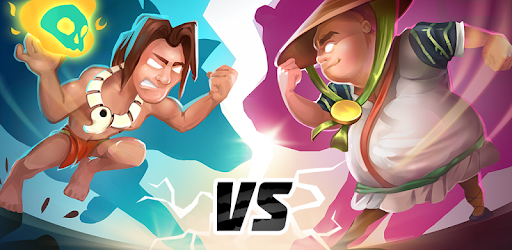
Join the online multiplayer battle arena in the universe of the Spirit Run: Multiplayer, an online endless runner! Enjoy high-speed action with intense real-time running multiplayer fights! Step into the mystical lands of the ancient Aztecs, where you must find your inner spirit, transform into a powerful animal, and defend the sacred Temple from impending doom. Are you ready to face the challenge clash, enjoy a fun race against players worldwide, and become one of the heroes in this endless runner adventure?
🔥6 Reasons To Play Online in Spirit Run Multiplayer🔥
Enjoy Endless Multiplayer Action!
Compete with real-world players in idle online tournaments. Beat your competitors, participate in limited-time special events, and collect powerful items to gain victory in dynamic multiplayer knockout battles. Are you a solo player? Or teaming up with your squad of friends? Anyway, every online sprint is packed with an unforgettable competitive experience!
Transform Into Legendary Beasts!
In Spirit Multiplayer Runner, you can transform into different powerful temple creatures! Choose from the gang of unique characters with their special idle transformations and don’t be afraid to die:
🐺Wolf – The running king of speed and hunting precision
🦊Fox – Quick racing creature, perfect for jumping and navigating tricky paths
🐻Bear – Strong animal who smashes obstacles with ease
🐆Panther – Stealthy jungle predator
🐼Panda – Balanced creature for long-distance Mario cart races
🦄Unicorn – Magic animal, who glides effortlessly like surfers
🐾BigFoot – The legendary racing guardian, full of idle power
🦌Deer – Fast animal who races like the wind.
Each transformation in this multiplayer endless runner gives you new abilities to race with other players. Choose with your friends a favorite and master its powers!
Running Game Modes & Stunning Multiplayer Environments!
Escape from monsters with your friends through breathtaking landscapes from adrenaline-pumping jungles and volcanic terrains to ancient ruins and sacred temples. Every race will stun your imagination with new challenges, climbing, jumping, and countless enemies.
Use Powerful Spells & Weapons!
You and your friends can gain an advantage in running multiplayer battles against other players with unique runner game items and abilities:
⚡Lightning – Shock your enemies and slow them down
🌬Tornado – Dash away from obstacles and rivals like a pro
🛠Bear Trap – Set deadly traps to stop crowds of the opponents
🔮Temple Skull – Summon a powerful spirit guardian
✨Meteor Rain – Rain destruction upon your enemies
🏃Run Booster – Gain racing speed bursts and don’t be afraid to die
💭Magnet – Attract soul orbs, power-ups, and other rewards
Customize Your Spirit Warrior in the Spirit Runner!
Express yourself online with over 100 skins, clothing, accessories, and unique outfits! Dress as a Pharaoh, Viking, Rock Star, Cowboy, Ancient Warrior, Hip-Hop Star, or even a Hot-Dog! Change hairstyles, jewelry, and more in this outstanding running game.
Offline Mode & Quick Matches!
You don’t have an internet connection or the opportunity to play in online multiplayer runner mode? No problem! Compete with AI-controlled opponents in Offline Mode to refine your skills in real-time!
🌟From the Creators of Zombie Runner!🌟
The team behind the endless runner game Zombie Run, which has over 30 million downloads worldwide, now brings you Spirit Running Multiplayer! If you love the rush of dodging obstacles and climb racing for survival, this online runner will take your excitement to the next level!
💀Join the Spirit Run Multiplayer Community!💀
Connect with other runners, share your rewards, and stay updated on new running game features! Follow us on social media and be part of the friends’ community of passionate Spirit Runners.
Are you ready to unleash your inner spirit and compete in the most exciting Endless Runner of all time? Download Spirit Run Multiplayer now and embark on unforgettable online challenges!
New Update available!
We have cleaned up a few things behind the scenes to improve your experience.
Bug fixes and improvements.
Keep running!
Allows applications to open network sockets.
Allows applications to access information about networks.
Allows access to the vibrator.
Allows using PowerManager WakeLocks to keep processor from sleeping or screen from dimming.


