Home  /  Sports Apps  / Paragliding Pilot Retrieve on Windows Pc

Paragliding Pilot Retrieve on Windows Pc

Developed By: Jan Cees Venema

License: Free

Rating: 5,0/5 - 1 votes

Last Updated: August 04, 2026

Download on Windows PC

Compatible with Windows 10/11 PC & Laptop

App Details

Version v6.0
Size 5.5 MB
Release Date September 18, 25
Category Sports Apps

App Permissions:
Allows an app to access precise location. [see more (5)]

What's New:
Change any of the 12 messages to your liking and/or in your own language. [see more]

Description from Developer:
Stay Connected, Wherever You Land

As a cross-country paragliding pilot, you know one thing for sure: you don’t always land where you expected. Whether you touch down miles from ba... [read more]

App preview ([see all 25 screenshots])
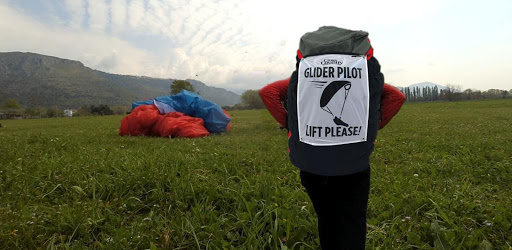
App preview

About this app

On this page you can download Paragliding Pilot Retrieve and install on Windows PC. Paragliding Pilot Retrieve is free Sports app, developed by Jan Cees Venema. Latest version of Paragliding Pilot Retrieve is v6.0, was released on 2025-09-18 (updated on 2026-08-04). Estimated number of the downloads is more than 1,000. Overall rating of Paragliding Pilot Retrieve is 5,0. Generally most of the top apps on Android Store have rating of 4+. This app had been rated by 1 users, 1 users had rated it 5*, 0 users had rated it 1*.

How to install Paragliding Pilot Retrieve on Windows?

Instruction on how to install Paragliding Pilot Retrieve on Windows 10 Windows 11 PC & Laptop

In this post, I am going to show you how to install Paragliding Pilot Retrieve on Windows PC by using Android App Player such as BlueStacks, LDPlayer, Nox, KOPlayer, ...

Before you start, you will need to download the APK/XAPK installer file, you can find download button on top of this page. Save it to easy-to-find location.

[Note] You can also download older versions of this app on bottom of this page.

Below you will find a detailed step-by-step guide, but I want to give you a fast overview of how it works. All you need is an emulator that will emulate an Android device on your Windows PC and then you can install applications and use it - you see you're playing it on Android, but this runs not on a smartphone or tablet, it runs on a PC.

If this doesn't work on your PC, or you cannot install, comment here and we will help you!

Step By Step Guide To Install Paragliding Pilot Retrieve using BlueStacks

  1. Download and Install BlueStacks at: https://www.bluestacks.com. The installation procedure is quite simple. After successful installation, open the Bluestacks emulator. It may take some time to load the Bluestacks app initially. Once it is opened, you should be able to see the Home screen of Bluestacks.
  2. Open the APK/XAPK file: Double-click the APK/XAPK file to launch BlueStacks and install the application. If your APK/XAPK file doesn't automatically open BlueStacks, right-click on it and select Open with... Browse to the BlueStacks. You can also drag-and-drop the APK/XAPK file onto the BlueStacks home screen
  3. Once installed, click "Paragliding Pilot Retrieve" icon on the home screen to start using, it'll work like a charm :D

[Note 1] For better performance and compatibility, choose BlueStacks 5 Nougat 64-bit read more

[Note 2] about Bluetooth: At the moment, support for Bluetooth is not available on BlueStacks. Hence, apps that require control of Bluetooth may not work on BlueStacks.

How to install Paragliding Pilot Retrieve on Windows PC using NoxPlayer

  1. Download & Install NoxPlayer at: https://www.bignox.com. The installation is easy to carry out.
  2. Drag the APK/XAPK file to the NoxPlayer interface and drop it to install
  3. The installation process will take place quickly. After successful installation, you can find "Paragliding Pilot Retrieve" on the home screen of NoxPlayer, just click to open it.

Discussion

(*) is required

Stay Connected, Wherever You Land

As a cross-country paragliding pilot, you know one thing for sure: you don’t always land where you expected. Whether you touch down miles from base, in a tricky spot, or need urgent assistance, quick communication with your retrieve team is essential.

This app makes that simple. With just a few taps, it locks in your GPS position and lets you send a ready-to-go message, fast, clear, and stress-free. In normal flights, it’s convenient. In case of an accident, it could be vital.

How It Works

1. Switch on GPS
Make sure your phone’s GPS is enabled before starting.

2. Launch the app
Give it 20–45 seconds for a precise GPS fix. Your location is instantly shown as a Google Maps pin.

3. Pick your message
Tap “Select message.” From the list of 12 common situations (waiting for pickup, safe at base, making your own way back, or requesting help), choose what fits your situation. The selected text appears on the main screen, easy to change anytime.

4. Send without location
For simple updates like “Back at base”, hit “Send message.” Choose your messaging service, send it off, and add extra details if needed.

5. Send with location
Need your team to find you quickly? Send your chosen message with a GPS pin in Google Maps format, including precise latitude and longitude.

6. Customize messages
Want to write in your own words or language? Tap “Change message,” edit the template, and save it. Your personalized version is ready to go.

Why This App Matters

🚀 Fast and effortless – Just a few taps and your team knows your status.

📍 Exact location sharing – No confusion, no copy-pasting coordinates.

🌍 Fully customizable – Messages in your own style or language.

🛑 A lifeline in emergencies – If you’re injured or in trouble, the app helps you instantly alert your retrieve team with your exact location.

No matter where the wind carries you, into new valleys, deep terrain, or unexpected landing zones, this app keeps your crew connected to you at all times. Reliable in the routine, essential in the unexpected.

App Properties – Built for Pilots, Built for the Field

⚡ Minimal Data Use
This app is designed to stay ultra-light on data transfer—a big advantage when you’re flying in remote areas with spotty coverage. Each retrieve message is only about 150 bytes, small enough to slip through even a weak connection.

📡 No Internet? No Problem.
Out in the wild, mobile data often disappears when you need it most. While most messaging services fail without internet, SMS still works. And here’s the key:
- GPS doesn’t rely on internet, so your location is still accurate.
- SMS doesn’t require data, so your message and coordinates can still be delivered.
- This simple fallback means your retrieve team can find you—even if the network is barely there.

🎯 GPS Performance
The app is built for open spaces, exactly where we pilots land and fly. In these conditions, GPS reception is strong, with accuracy down to just a few meters. Indoors, however, GPS struggles, so the app is not intended for indoor use.

👉 Bottom line: Whether you’ve got strong signal, weak coverage, or no internet at all, this app keeps working. Light, reliable, and adapted to the realities of XC flying.
Change any of the 12 messages to your liking and/or in your own language.
Allows an app to access precise location.
Allows an app to access approximate location.
Allows applications to open network sockets.
Allows an application to read from external storage.
Allows an application to access extra location provider commands.